











For teams weighing cheaper alternatives to DocuSign: Dropbox Sign, PandaDoc and Yousign compared on €, £ and US$ prices, envelope caps and EU hosting.
Cheaper Alternatives to DocuSign exist, but most of the saving comes from sending volume, not seat price. Below you will find euro, sterling and dollar prices, plan caps and hosting for Dropbox Sign, PandaDoc and Yousign, each set against DocuSign.
The core difference is the allowance. DocuSign Standard allows 100 envelopes per user per year, while Dropbox Sign, PandaDoc Starter and Yousign Plus send without a count. Choose by workflow and data location, not by the headline number.
TL;DR
- Dropbox Sign suits small teams that send a lot and want plain signing. Skip it if you have five or more seats, because those are sold through sales. It also does not name an EU hosting region.
- PandaDoc suits sales teams that build quotes and proposals before the signature. If you only need signatures, Starter covers that, and Business costs more per seat than DocuSign Business Pro. Prices are listed in US$ only.
- Yousign suits European buyers who want French hosting and eIDAS add-ons, billed in euros. Skip it if you need a quote builder or dollar and sterling pricing.
- DocuSign is still fine if you send fewer than 100 envelopes per user a year and rely on its 1,000+ integrations.
Cheaper Alternatives to DocuSign at a glance
All three alternatives cost about the same per seat as DocuSign, but they remove its sending cap. The table compares entry plans, team plans, allowances and hosting.
| Tool | Entry paid plan, per month billed annually | Team plan, per user per month billed annually | Sending allowance | Data location | Editorial pick |
|---|---|---|---|---|---|
| DocuSign | Personal: US$10 / €9 / £8 | Standard: US$25 / €23 / £20 | Personal: 5 envelopes a month. Standard: 100 per user per year | Likely Australia, US, EU and/or Canada; account region not stated | Baseline |
| Dropbox Sign | Essentials: US$15 / €13.33 / £11.67 | Standard: US$25 / €24 / £20 (2+ users) | Unlimited signature requests | No default region named | Best value for small teams |
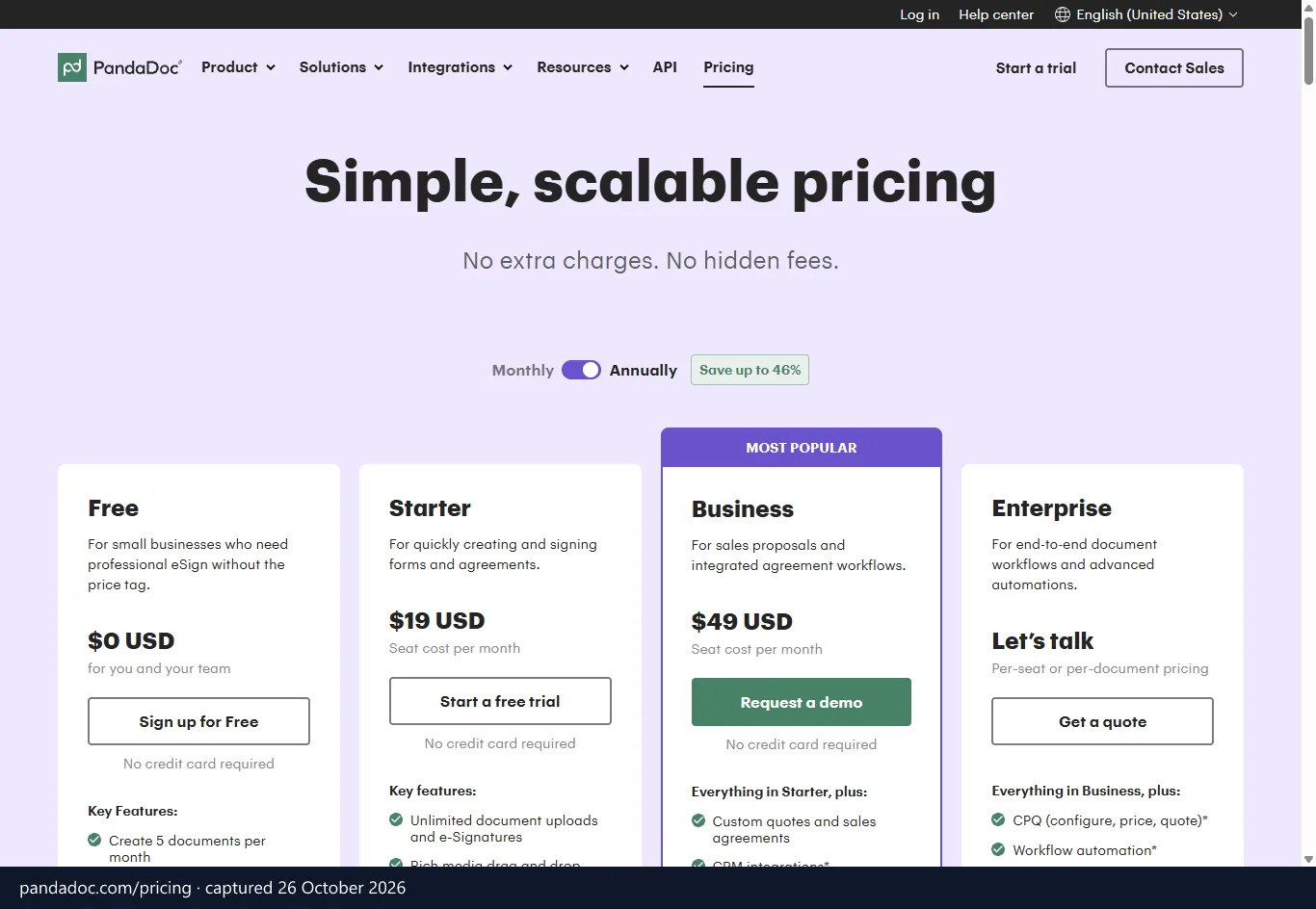
| PandaDoc | Starter: US$19 per seat (free plan also available) | Business: US$49 per seat | Free: 5 documents a month. Starter: unlimited e-signatures | US or EU version; EU version in Frankfurt | Best for sales proposals |
| Yousign | One: €9 (free plan also available) | Plus: €23 | Free: 2 requests a month. One: 10. Plus: unlimited | Exclusively France | Best for EU data residency |
Source: each vendor's pricing, privacy and legal pages, checked October 2026. Prices are before VAT and shown in the currencies each vendor lists.
The editorial picks rest on price, plan limits, EU data location, DPA terms and integrations as the vendors list them. They are not test results.
Seat for seat, the gap is small. In dollars and pounds, Dropbox Sign Standard matches DocuSign Standard exactly, and in euros it costs €1 more. Yousign Plus matches DocuSign Standard to the euro.
The real difference opens at the allowance. DocuSign Standard also adds a one-time bonus of 5 SMS deliveries and 5 identity verifications. If you send in volume, the alternatives win on cost per document. If you send little, the savings are small.
Matching signature tools to your workflow
Match the tool to how your team sends, not to the longest feature list. Four common profiles cover most buyers.
Freelancers and solo consultants
Two cheap options sit at the bottom. Yousign One gives one user 10 signature requests a month and your own logo. PandaDoc Free costs nothing and covers 5 documents a month.
Compare that with DocuSign Personal, which costs the same €9 as Yousign One but stops at 5 envelopes a month. Say you send six proposals in a busy month. On DocuSign Personal you are over the line, while on Yousign One you are not.
If your volume swings, Dropbox Sign Essentials removes the count entirely. It includes 5 templates and comes with a 30-day trial. Yousign Free (2 requests a month, unlimited self-signature) works if most of what you sign is your own paperwork.
Sales teams and agencies
PandaDoc Business is the fit for teams that quote before they sign. It adds custom quotes and sales agreements, unlimited templates, custom branding, a content library, deal rooms and approval workflows. CRM integrations, web forms and bulk send draw on usage credits.
Picture an agency where a partner must approve every proposal before it goes out. Approval workflows on Business handle that step. Real-time tracking, which even the free plan lists, shows when the client opens the file.
Be clear about the price, though. DocuSign Business Pro lists web forms, payments during signing and bulk send for less per seat. PandaDoc pays off only if it replaces a quoting tool you already pay for.
High document throughput
Dropbox Sign fits teams that send all day. Essentials is for one user, while Standard needs two or more. Both include unlimited signature requests, an audit trail and email support.
Yousign Plus is the other unlimited option in euros. It adds approvals, templates, workspaces, contact sync, plus Zapier and HubSpot connectors. An HR team sending onboarding packs every week would sit comfortably on either.
Watch the template count, because it is the quiet limit. Dropbox Sign allows 5 templates on Essentials and 15 on Standard. If you run more than 15 recurring document types, PandaDoc Business, with unlimited templates, is the better home.
Regulated EU industries
Yousign Plus and Pro are built for this. Both offer advanced (AES) and qualified (QES) signatures as add-ons, and the company names a data protection officer. Pro adds bulk signatures, document collection, automated forms and SSO on yearly plans.
The level you need comes from your regulator or your counterparty, not from the vendor. For a lawyer or lender who may one day face an AES or QES request, a tool that sells it as an add-on avoids a later switch. PandaDoc also states eIDAS compliance, with QES on annual plans only.
The hidden math behind DocuSign envelope limits
The cap, not the price tag, is what makes DocuSign costly for busy teams. Personal covers one user and 5 envelopes a month, and Standard includes 100 envelopes per user per year.
Business Pro is listed as everything in Standard plus extras, so the allowance follows you up the ladder. The only DocuSign plan with custom envelope limits is Enhanced, which is sold through sales.
| Plan | Monthly billing | Annual billing, per month | Allowance and inclusions |
|---|---|---|---|
| Personal | US$15 / €14 / £12 | US$10 / €9 / £8 | 1 user, 5 envelopes a month, reusable templates, AI-assisted summary, 1,000+ integrations |
| Standard | US$45 / €39 / £34 | US$25 / €23 / £20 | Per user, 100 envelopes per user per year, shared team templates, real-time commenting, branding, delegated signing |
| Business Pro | US$65 / €62 / £54 | US$40 / €38 / £33 | Per user, everything in Standard plus web forms, payments during signing, interactive fields, data verification and bulk send |
| Enhanced | Sold through sales | Sold through sales | Custom envelope limits, central organisation management, 24/7 live technical support, SSO, Salesforce document generation |
A free trial is offered, but its length is not stated.
Notice the gap between the two billing columns. Monthly billing on Standard costs close to double the annual rate in dollars. Every price elsewhere in this article uses the annual figure unless it says otherwise.
Personal suits someone who signs a handful of documents a month. It does not suit a business that sends proposals, onboarding packs and renewals all year.
How a cap changes your cost per document
On an unlimited plan, each extra document costs nothing. On a capped plan, the cost per document stays flat until the cap, then jumps.
Take an agency where two people send 250 contracts a year. Two Standard seats carry 100 envelopes each, so 250 contracts overshoots the allowance. You can buy a seat for someone who never sends, move to Enhanced through sales, or ration your sending.
The same agency on Yousign Plus or PandaDoc Starter keeps two seats and never counts. That is the real saving, and it grows with every extra contract.
When you hit the limit, the plan text gives you those three outcomes and nothing else. None of them has a price you can read off a page in advance, which makes renewals harder to budget. Someone on your team also ends up watching the count.
The plan figures in the table are DocuSign's own. They are enough to make the case for any team sending more than 100 documents per seat.
Dropbox Sign for flat rate unlimited sending
Dropbox Sign is the simplest way to stop counting envelopes. It sells unlimited signature requests on both public plans and keeps the feature list short.
| Plan | Monthly billing | Annual billing, per month | Users | Templates |
|---|---|---|---|---|
| Essentials | US$20 / €17.50 / £15.83 | US$15 / €13.33 / £11.67 | 1 user | 5 |
| Standard | US$30 / €29 / £24 | US$25 / €24 / £20 per user | 2 or more users, 5+ sold through sales | 15 |
Both plans include unlimited signature requests, an audit trail and email support. Premium is a custom quote for larger teams. A 30-day free trial gives you a month to run real contracts through it.
Setup is deliberately light. You upload a document, place fields and send it. That suits owners who sign contracts themselves and have no IT help.
On security, the Dropbox Sign Trust Center lists GDPR, eIDAS, ISO/IEC 27001, ISO/IEC 27018, SOC 2 Type 2 and HIPAA. That covers the baseline most procurement checklists ask about.
Where Dropbox Sign falls short
- Template caps. You get 5 on Essentials and 15 on Standard, which can pinch a team with many document types.
- Seat rules. Standard needs at least two users, and five or more go through sales, so a growing team loses the public price.
- Thinner team features. Standard lists templates, an audit trail and email support. DocuSign Standard adds shared team templates, real-time commenting, branding and delegated signing.
- EU hosting. "Data residency" appears as a plan feature, but no default region is named.
Against DocuSign Standard, the price is level and the allowance is not. That makes Dropbox Sign the better deal for volume senders and a neutral choice for everyone else. If you use DocuSign's commenting or delegated signing every day, you would give those up, and the full Dropbox Sign plan list shows exactly what each tier includes.
PandaDoc for interactive quotes and sales proposals
PandaDoc suits teams that write documents before they sign them. Its editor, quoting and signing live in one place.
| Plan | Monthly billing | Annual billing, per month | Key inclusions |
|---|---|---|---|
| Free | US$0 | US$0 | 5 documents a month, document editor, real-time tracking, 24/7 email and chat support, limited API access |
| Starter | US$35 | US$19 per seat | Unlimited document uploads and e-signatures, editor, up to 5 templates, real-time tracking |
| Business | US$65 | US$49 per seat | Everything in Starter plus custom quotes and sales agreements, unlimited templates, custom branding, content library, deal rooms, approval workflows |
| Enterprise | Sold through sales | Sold through sales | Everything in Business plus CPQ, workflow automation, smart content, SSO, team workspaces and notary |
Prices are listed in US$ only.
Mind where each feature sits. Custom quotes are on Business, while full CPQ is on Enterprise. If you need configure-price-quote logic, Business is not the end of the road.
Starter is the bargain. It gives you unlimited e-signatures and a document editor for less than DocuSign Standard, without the cap. PandaDoc also offers a SOC 2 Type II report on request.
Where PandaDoc falls short
- Usage credits. CRM integrations, web forms and bulk send need credits on Business, so the sticker price is not always the final bill.
- Qualified signatures. QES is available on annual plans only.
- Dollar pricing. A euro or sterling budget carries exchange-rate movement.
- Template limit. Starter stops at 5 templates.
- Seat cost. Business costs US$9 more per seat than DocuSign Business Pro.
PandaDoc replaces two jobs: writing the proposal and signing it. On DocuSign, the same flow means more than one product. Run a simple test: add what you pay for a quoting tool to your DocuSign seats, then compare the total with PandaDoc Business.
If you pay for no quoting tool, Starter is the fair comparison. The PandaDoc plans and current offers page lists the credit-based features in detail.
Yousign for certified European data hosting
Yousign is the pick if EU data location is a hard requirement. It names one hosting country, publishes a DPA and prices in euros.
Yousign hosts exclusively in France, on Amazon Web Services' French branch. The evidence file for each signature is archived at Arkhinéo, an archiver certified at European level. The company is Youtrust SAS (formerly Yousign), based in Caen.
DocuSign's privacy notice says personal information is likely stored in Australia, the United States, the European Union and/or Canada. It does not say which region your account uses. For a legal team that has to name a location in a vendor register, a single stated country is simpler to defend.
| Plan | Monthly billing | Annual billing, per month | Includes |
|---|---|---|---|
| Free | €0 | €0 | 1 user, 2 signature requests a month, unlimited self-signature, inbox, automatic reminders |
| One | €11 | €9 | 1 user, 10 signature requests a month, reminders, basic fields, custom logo, real-time monitoring |
| Plus | €30 | €23 per user | Unlimited eSignatures, SMS authentication, approvals, templates, workspaces, contact sync, Zapier and HubSpot; AES and QES as add-ons |
| Pro | €48 | €38 per user | Everything in Plus plus unlimited Automated Forms, bulk signatures, document collection, custom experiences; SSO on yearly plans; AES and QES as add-ons |
Prices exclude VAT.
A 14-day free trial is available. That is shorter than Dropbox Sign's 30 days, but enough to test a template and a reminder flow.
Where Yousign falls short
- Euros only. US and UK teams carry the exchange rate.
- No quote builder. None of its plans lists one, so proposals need another tool.
- Low entry caps. Free allows 2 requests a month and One allows 10, so a growing solo user moves to Plus quickly.
- Add-on cost. AES and QES are add-ons, and SSO on Pro needs a yearly plan.
Euro for euro, the team tiers match DocuSign: Plus equals Standard, and Pro equals Business Pro. You buy Yousign for the stated hosting country, the DPA and the unlimited allowance, not for a lower price. The Yousign plans and free tier page tracks any changes to those tiers.
Calculating total costs across small team sizes
For most small teams, the cheapest option is the one whose allowance matches your volume. To get a yearly figure, multiply the per-seat price in the tables above by your headcount and by twelve.
| Team profile | DocuSign plan that fits | Uncapped option to start from | What to check |
|---|---|---|---|
| Solo, 8 to 10 documents a month | Standard (Personal stops at 5) | Dropbox Sign Essentials; Yousign One if you stay at 10 or fewer | Yousign One's monthly ceiling |
| Three people, 500 documents a year | Standard, but three seats carry 100 envelopes each | PandaDoc Starter, Yousign Plus or Dropbox Sign Standard | Dropbox Sign's 15-template limit |
| Five-person sales team | Business Pro | PandaDoc Business, if it replaces a quoting tool | PandaDoc's usage credits |
A solo practitioner
DocuSign Personal is out, since it stops at 5 envelopes a month. Standard is borderline, because 8 to 10 a month sits close to its 100-a-year allowance. One busy quarter breaks it.
Dropbox Sign Essentials is unlimited and costs less than DocuSign Standard in every currency. Yousign One is cheaper still, but if you hit 10 requests in a month you are stuck until the next one. PandaDoc Starter is the dollar-priced alternative with a document editor.
A three-person team
At 500 documents a year, three DocuSign Standard seats run out of envelopes. Dropbox Sign Standard costs about the same per seat and has no count at all.
Yousign Plus is unlimited too, and PandaDoc Starter has the lowest dollar price per seat. If the team also wants templates and approvals, Yousign Plus includes both. On Dropbox Sign, check the 15-template limit against your own document types.
A five-person sales team
Five DocuSign Business Pro seats carry 100 envelopes apiece. The plan lists web forms, payments and bulk send, but no quote builder. PandaDoc Business adds custom quotes, deal rooms and approval workflows, at a higher seat price.
Whether it costs less overall depends on what you drop. If you cancel a separate quoting subscription, the gap may close; if you keep it, PandaDoc is the pricier choice. Dropbox Sign cannot serve this team on its public price, because five seats go through sales.
Extras that change the bill
- Yousign AES and QES are add-ons on Plus and Pro.
- PandaDoc CRM integrations, web forms and bulk send use credits on Business.
- DocuSign Standard's 5 SMS deliveries and 5 identity verifications are a one-time bonus, not a monthly allowance.
- Monthly billing raises every figure, as the plan tables show.
If your shortlist comes down to keeping a capped plan or moving to an uncapped one, the DocuSign and Dropbox Sign price comparison sets their European prices, plans and GDPR terms side by side.
European data residency and VAT billing rules
Data location, DPA terms and VAT treatment are where European buyers should separate these tools. Signature records hold names, email addresses and signing evidence. GDPR Article 28 therefore applies, and it requires a written contract between you and the vendor.
| Vendor | Where data sits | Transfer basis stated | DPA |
|---|---|---|---|
| DocuSign | Likely Australia, US, EU and/or Canada; account region not stated | Binding Corporate Rules, Standard Contractual Clauses, sub-processor list | Not stated in its privacy notice |
| Dropbox Sign | Region not named; "data residency" appears as a plan feature | EU-US and Swiss-US Data Privacy Frameworks with UK Extension, Standard Contractual Clauses | Not mentioned on its privacy or pricing pages |
| PandaDoc | US or EU version; the EU version runs in Frankfurt, Germany | EU-US, UK Extension and Swiss-US Data Privacy Framework, sub-processor list | Yes |
| Yousign | Exclusively France | Standard Contractual Clauses for transfers outside the EU, sub-processor list | Yes, with a named data protection officer |
DocuSign's Binding Corporate Rules are approved by EU data protection authorities, which is a strong transfer mechanism. Docusign International (EMEA) Ltd. in Dublin handles EEA visitors. Still, the notice does not tell you which region your account uses.
PandaDoc's US and EU versions are separate installations, so choose the EU version before you load documents. For a strict EU-only requirement, that leaves Yousign and PandaDoc's EU version.
Which signature level you need
The eIDAS Regulation (EU) No 910/2014 defines simple, advanced (AES) and qualified (QES) signatures. Article 25 says an electronic signature cannot be denied legal effect only because it is electronic. A QES has the same effect as a handwritten one.
For most B2B contracts, a simple signature is enough. AES or QES comes in when a regulator, a bank or your counterparty asks for it. Some national laws still require handwritten or notarised form for particular documents, so check your own country's list before you move those workflows.
VAT for EU and UK buyers
Every price in this article is before VAT. Say you are a VAT-registered business in Ireland, France, Spain or Italy, buying from a supplier established in another member state. Article 196 of Directive 2006/112/EC then makes you account for the VAT: the vendor invoices without it, and you declare it in your own return.
Domestic supplies work differently. A French company buying from Yousign, which is established in France, sees French VAT on the invoice. Our guide to the VAT reverse charge walks through the return entries.
The United Kingdom is not in the EU, so that mechanism does not apply to UK buyers. A UK VAT-registered business buying from an overseas supplier uses the UK reverse charge under HMRC VAT Notice 741A. An invoice from a UK-established supplier carries UK VAT at the standard 20% rate instead.
Frequently asked questions about DocuSign competitors
These are the questions buyers raise most often before switching.
Are lower-cost tools legally binding in the UK and EU?
Yes, for most commercial contracts. In the EU, eIDAS Article 25 stops a signature being rejected only because it is electronic. UK law also treats electronic signatures as valid for most commercial documents, and for US counterparties the ESIGN Act of 2000 does the same job.
What matters is the evidence trail and, for regulated deals, the signature level. The price of the tool does not change whether a signature counts. Exceptions exist for documents that national law says must be handwritten or notarised.
What happens when I hit my DocuSign envelope limit?
Personal allows 5 envelopes a month and Standard allows 100 per user per year. Beyond that, the plan with custom envelope limits is Enhanced, sold through sales.
Dropbox Sign has no count on Essentials or Standard. Yousign Plus and PandaDoc Starter also send without a count, but their entry plans cap you: Yousign Free at 2 requests a month, One at 10, PandaDoc Free at 5 documents. Before you decide, pull last year's sent count by user.
Can I switch without losing signed contracts?
Yes, if you export before you cancel. Download every completed PDF and its audit certificate, because the certificate is your evidence if a signature is ever disputed.
Keep both accounts open until your last pending envelopes finish. Then store the files by year in your own drive. Yousign archives evidence files at Arkhinéo, but that covers documents signed in Yousign, not your history from another tool.
Which alternative has the best free tier?
PandaDoc Free gives you 5 documents a month, a document editor, real-time tracking, 24/7 email and chat support and limited API access. Yousign Free gives you 2 signature requests a month, one user, unlimited self-signature, an inbox and automatic reminders.
PandaDoc wins on volume, while Yousign wins if your data must stay in France. Dropbox Sign offers a 30-day trial instead of a free plan.
Does Dropbox Sign or PandaDoc store data in the EU?
PandaDoc can. Its EU version runs in Frankfurt, and you choose it up front because the two versions are separate installations. Dropbox Sign relies on the Data Privacy Framework and Standard Contractual Clauses, and its pages do not name a default region.
Which signature platform should you pick
The right pick depends on what DocuSign is costing you. If you only want the cap gone, pick Dropbox Sign. Pick PandaDoc if your reps lose hours building quotes. If your counsel demands French hosting and eIDAS options priced in euros, pick Yousign.
If you send fewer than 100 envelopes per user a year, staying on DocuSign costs little. Your next step is simple. Count the envelopes you sent over the last 12 months and how many people sent them, then match that against the allowances in the tables above.