











Zapier vs n8n for European teams: see task vs execution pricing, Zapier's Code step limits and where each tool stores your data before you commit.
TL;DR: Zapier vs n8n comes down to ease versus control. Zapier suits non-technical teams that want managed app connections working today. It is a poor fit for high-volume data jobs or strict EU data residency. n8n suits technical and privacy-sensitive teams that want self-hosting and per-run billing, but not solo operators who never want to touch a server. Below you will find both price lists, the limits on Zapier's Code step and where each tool keeps your data.
Quick verdict on Zapier vs n8n
Zapier leads on ease of use and ready-made connectors, while n8n leads on billing model, code depth and hosting choice. The table sets out the differences behind that split.
| Attribute | Zapier | n8n |
|---|---|---|
| Best for | Non-technical teams that need instant setup and managed connections | Technical teams, engineers and privacy-sensitive European companies |
| Poor fit | High-volume data processing, strict local data sovereignty | Solo non-technical operators who won't configure webhooks or maintain infrastructure |
| Billing unit | Per task (each successful action) | Per full workflow execution |
| Free option | Free plan, two-step Zaps only | Community Edition, self-hosted on your own server |
| Entry paid plan | Professional, from US$19.99 a month | Starter (cloud), from £20 a month |
| Users | Team plan capped at 25 users | Unlimited users on every cloud plan |
| Hosting | Managed cloud only, no self-hosting | Self-hosted (source-available) or n8n Cloud |
| App coverage | 9,000+ apps, managed by Zapier | 1,000+ integrations plus HTTP, GraphQL and webhook connectors |
| Webhooks | Professional plan and up | Every plan, including Community Edition |
| Custom code | Small JavaScript or Python snippets, no external libraries | JavaScript or Python at any step, npm libraries when self-hosted |
Source: Zapier's and n8n's pricing and comparison pages, checked October 2026. Prices are before VAT, annual billing.
Zapier is a cloud-only service that charges per successful task. n8n is source-available under its Sustainable Use License, so you can host it yourself or use n8n Cloud. It charges per full workflow run, however many steps that run contains.
That billing difference drives most of what follows. Per-task billing is easy to grasp until a workflow grows many steps. Per-run billing stays flat as steps multiply, but you pay in setup time and ownership.
The second split is who does the building. Zapier is no-code: you pick apps from menus, or describe the workflow to its Copilot assistant. n8n calls itself low-code and offers a drag-and-drop canvas. Even so, Zapier's comparison page points out that many common n8n actions need JavaScript expressions or code nodes, which makes the learning curve steeper.
Our editorial picks rest on price model, plan limits, EU data location, DPA terms and integrations, using the vendors' own figures. They are judgements, not test results.
- Best for non-technical teams: Zapier
- Best for EU data residency: n8n
- Best value for long, high-volume workflows: n8n
When to choose each automation platform
The right tool depends on who builds the automations and where the data must sit. Here is how that plays out in practice.
When does Zapier make more sense?
Zapier fits teams where sales, marketing and HR staff build their own automations. They describe a workflow in plain language, and Copilot proposes the trigger, the actions and the field mapping. App logins go through pre-built authentication. Nobody pastes API keys into a form.
It also wins when your stack leans on niche SaaS tools. Zapier says every one of its integrations is officially governed, so API changes get fixed in the background. If a long-tail tool you rely on would only have a community-built connector elsewhere, that maintenance gap is a real risk.
- A marketer who routes new form leads into the CRM and a chat channel
- An HR coordinator who triggers onboarding tasks when a contract is signed
- An operations lead who wants an AI assistant to act on company apps
The catch is scope. The free plan stops at two steps, so real workflows push you onto a paid plan quickly. Once logic gets complex, building it in Zapier gets harder, not easier.
When does n8n make more sense?
n8n suits multi-branch business logic, loops and bulk data transformations. Those are the jobs that burn through per-task allowances. A nightly job that reads a large export, reshapes every row and writes it to a database is the typical example.
It also suits organisations that require customer records to stay in their own infrastructure. That can mean an on-premises server, a private cloud or a German data centre. The hosting details sit in the data residency section below.
The price of that control is ownership. Self-hosting means someone handles setup, updates, backups and uptime. n8n Cloud removes the server work, but you still need to be comfortable with webhooks, expressions and code nodes.
Three questions settle most cases:
- Who builds the automations? Non-technical staff point to Zapier, developers to n8n.
- How many steps does a typical run have? Two or three steps work fine on Zapier, while dozens favour n8n's per-run billing.
- Where must the data sit? If policy says "inside our own infrastructure or the EU", n8n is the only one of the two that can meet it.
Workflow execution versus task billing models
Zapier bills per task, meaning each successful action, while n8n bills per workflow execution, however many steps it holds. For short workflows the gap is small. For long ones it decides your bill.
What does Zapier cost?
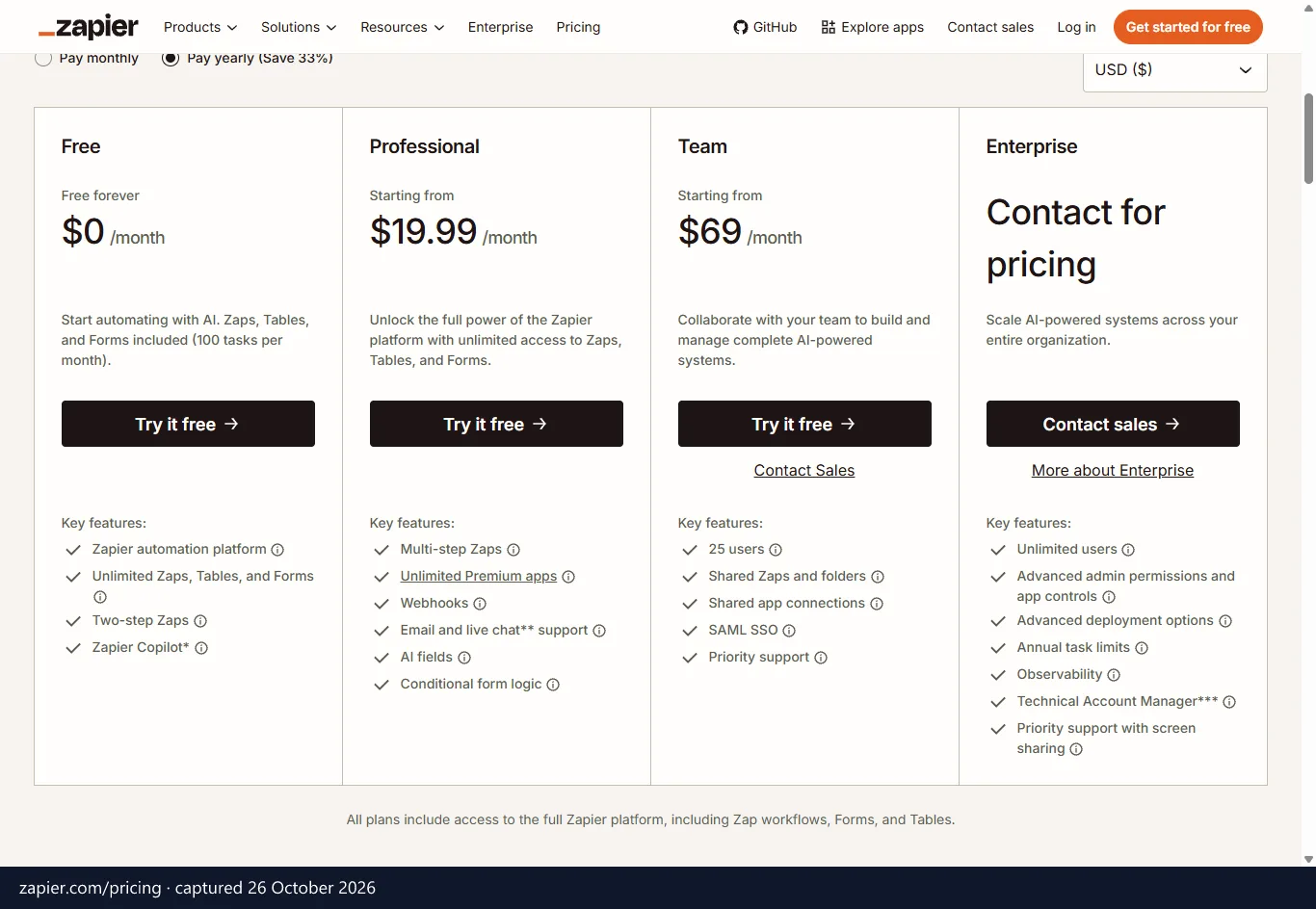
According to Zapier's pricing page, checked October 2026, there are four tiers, priced in US dollars before VAT. Anything longer than two steps needs Professional or above.
| Plan | Per month, billed annually | Per month, billed monthly | Included |
|---|---|---|---|
| Free | Free | Free | 100 tasks a month, unlimited Zaps, two-step Zaps, Tables and Forms |
| Professional | US$19.99 | US$29.99 | 750 tasks, multi-step Zaps, unlimited premium apps, webhooks |
| Team | US$69 | US$103.50 | 2,000 tasks, 25 users, shared Zaps and app connections, SAML SSO |
| Enterprise | Custom | Custom | Custom tasks and users, advanced admin controls, dedicated account team |
Monthly billing costs more on every paid tier, and our page on Zapier's current European plans and offers tracks any changes.
What does n8n cost?
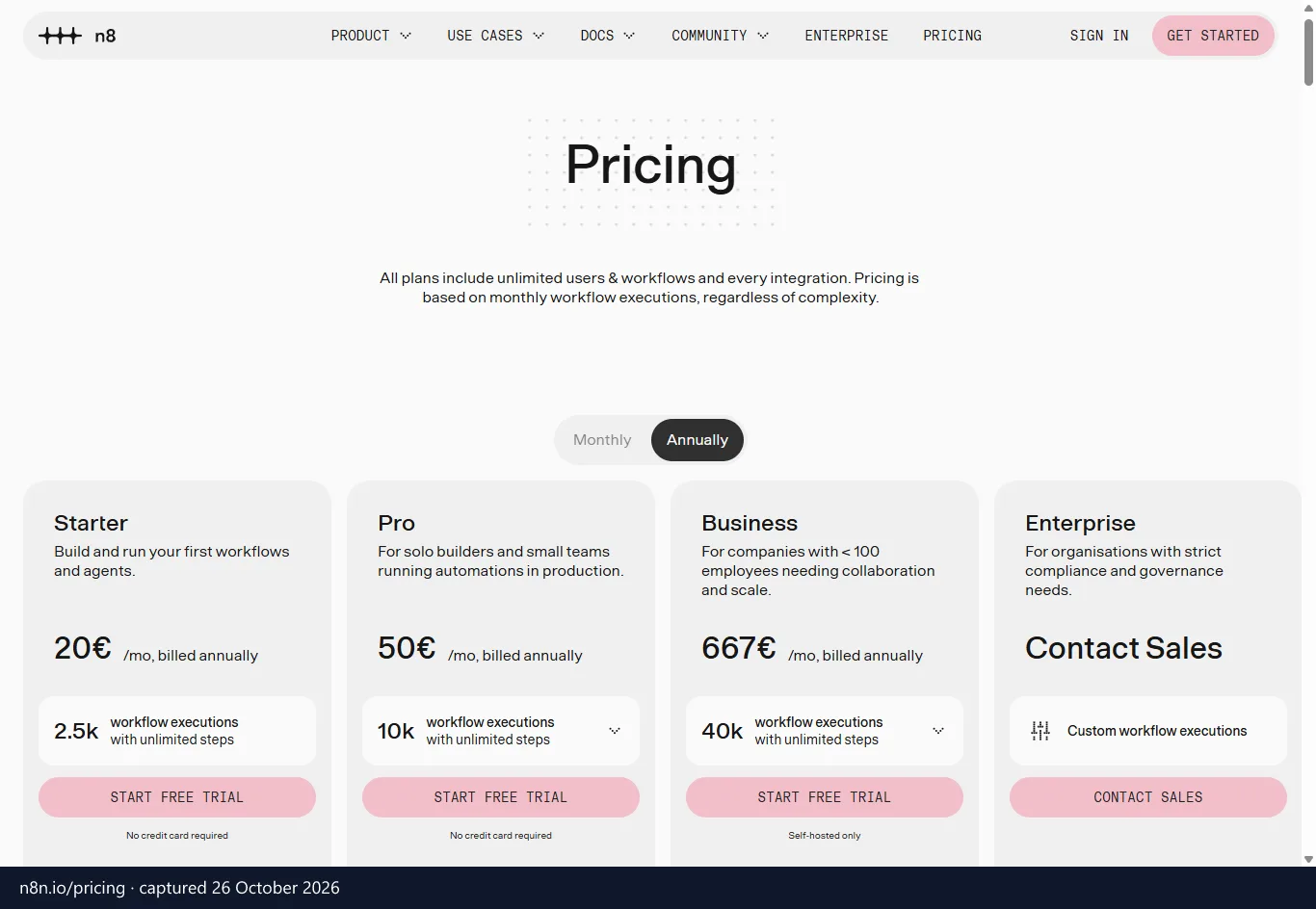
n8n's pricing page, checked October 2026, lists plans in pounds sterling before VAT. The same page shows euro prices to some visitors, as in the screenshot above (captured 26 October 2026): €20, €50 and €667 a month billed annually for Starter, Pro and Business. We show each currency as the vendor lists it and convert nothing.
| Plan | Per month, billed annually | Per month, billed monthly | Included |
|---|---|---|---|
| Community Edition | Free | Free | Self-hosted version from GitHub, you pay for the server |
| Starter | £20 | £24 | 2,500 executions, hosted by n8n, 1 shared project, 5 concurrent executions, 1,600 Assistant credits |
| Pro | £50 | £60 | 10,000 executions, hosted by n8n, 3 shared projects, up to 50 concurrent executions, admin roles |
| Business | £569 | £682 | 40,000 executions, self-hosted only, SSO and LDAP, multiple environments, Git version control |
| Enterprise | Custom | Custom | Custom executions, hosted or self-hosted, unlimited shared projects, log streaming |
n8n says every cloud plan includes unlimited users, unlimited workflows and all integrations. Business is self-hosted only. If you want n8n to run the servers, your options are Starter, Pro or Enterprise, a trade-off our breakdown of n8n's cloud and self-hosted costs covers in depth.
The Community Edition is free, but the server is not. n8n lists a virtual private server, Heroku, your own server or even a personal computer as deployment options, and you pay only for that infrastructure. Zapier's comparison page adds two cautions. A local install stops running when you shut your laptop, and enterprise deployments on AWS or on-premises servers can climb past $900 a month before maintenance labour.
n8n Cloud trades that work for a subscription. n8n says it removes technical setup and maintenance, connects apps in one click via OAuth and upgrades to new versions in one click. The free Community Edition and n8n's cloud plans therefore cover two very different buyers.
Why does the multi-step penalty matter?
According to n8n's comparison page, every action a Zap performs counts as a task. Its example is a ten-row table in a simple two-step Zap. That consumes ten tasks, because the action step runs once per row. Reading a record, writing a sheet row and posting a message each count separately.
Go over your allowance and each extra task costs 1.25 times the base task rate, n8n says. It warns that one careless run over thousands of rows can eat a large share of a month's budget. If your Zaps loop over lists, model that before you commit.
Zapier describes it differently. It says you pay only for completed work, and triggers and built-in tools such as Filter, Formatter, Paths, Delay and Looping do not use tasks. The real cost sits between the two descriptions, so count your own actions.
In n8n, a simple two-step workflow and a 200-step AI agent each count as one execution. You can add branches, loops and AI calls without raising the bill. The limits that remain are the execution allowance, the concurrency cap and, if you self-host, your own server capacity.
For a workflow with many steps that runs often, n8n costs less. For a handful of short Zaps, Zapier's Free or Professional plan is simpler, and you run nothing yourself. To price your busiest workflow both ways, put Zapier and n8n prices side by side in each vendor's own currency.
Technical constraints and custom code limits
Zapier's Code step handles small snippets, while n8n's Code node can carry real logic. The Zapier limits below come from n8n's comparison page, so read them as n8n's description of a rival. They are specific, though.
Where does Zapier's Code step stop?
Code by Zapier runs JavaScript or Python. n8n lists these hard limits:
- 30-second execution time
- 256MB memory cap
- 225 calls per 10 seconds for code steps, and Zap runs pause if they exceed it
- 6MB total size for code and data
- 250 items maximum in the returned output object
- No external libraries or npm modules
That is plenty for formatting a date or making one API call. It is not enough for processing a large dataset or running heavy calculations. If your automations never touch code, none of this affects you.
What does n8n add for developers?
The Code node runs JavaScript, or Python through Pyodide, at any step. You can also transform data with JavaScript expressions in other nodes. On self-hosted instances, n8n says you can use thousands of npm libraries from the Code node.
Self-hosters also get the Execute Command node, which runs system tools and external scripts. You can build your own nodes that call outside APIs, too. n8n frames this full extensibility as a self-hosted feature, so n8n Cloud users should not expect arbitrary npm imports.
Debugging is where developers save time. n8n shows input and output side by side for each node. You can pin sample data on a node and test it without rerunning the whole workflow, which matters on long pipelines.
Error handling goes deeper as well. n8n offers workflow-level error workflows, a dedicated Stop and Error node and retry settings on most nodes. Git version control and separate dev, staging and production environments arrive on the Business and Enterprise tiers, and queue mode spreads load across worker processes.
Zapier's equivalents are lighter. It has an Autoreplay feature for temporary errors that you cannot customise, plus custom branches for error handling. You can share Zaps as templates, but n8n notes there is no Git-style versioning.
Integration breadth and custom API flexibility
Zapier gives you far more ready-made connectors, while n8n lets you build any connection yourself. Which matters more depends on whether your tools are mainstream or obscure.
Zapier's comparison page claims over 9,000 officially managed integrations, with API maintenance and OAuth credentials handled centrally on every tier. n8n says it has 1,000+ integrations. Those include native nodes, credential-only nodes, verified partner-built community nodes and thousands of community-created nodes.
Counts differ depending on who counts. Other tallies put n8n at 400+ built-in nodes, extendable to 1,000+ with community nodes and API connections, while Zapier's page puts n8n at around 2,000. Treat the exact n8n figure loosely. The gap with Zapier is still large.
Which one gates webhooks and developer tools?
Webhooks are the sharpest difference. On Zapier they are a premium feature that starts at the Professional plan, so the free plan cannot receive them. n8n's comparison page calls this a paywall on a fundamental method of integration.
In n8n, the Webhook node is a core feature on every plan, including the free Community Edition. It gives any service a custom URL to trigger a workflow and supports multiple HTTP methods such as GET and POST. That matters if your automations start from your own application.
What if the app you need has no connector?
On n8n, you fall back on universal connectors for REST (HTTP requests) and GraphQL. You can also write JavaScript or Python inside the workflow. Approved community nodes are available even on cloud tiers, and you can build, deploy and share custom nodes.
The trade-off is upkeep. Zapier argues that many n8n nodes are community-maintained, so you rely on contributors to ship fixes when an API changes. If you build a connection by hand from HTTP requests, you also own the authentication, the error handling and every future API change.
Zapier fills its own gaps through the Developer Platform, which is used to build new app integrations. For commercial SaaS, Zapier is plug-and-play. When your target is an internal system or an unusual API, n8n is the better tool.
AI agents and autonomous workflow builders
Zapier makes AI easy to add to existing app workflows, and n8n gives you deeper control over how AI agents are built. Both support agents and the Model Context Protocol (MCP), but they aim at different builders. The details below come from each vendor's comparison page.
What AI tools does Zapier offer?
Zapier's AI layer includes Copilot for building Zaps from a prompt, AI Agents and pre-built ChatGPT steps. Its MCP server lets Claude, ChatGPT and other AI tools act on the 9,000+ apps. Zapier says those actions run through its governance layer and are logged like any other, and it lists AI Guardrails and human-in-the-loop controls.
The catalogue also counts over 450 AI-focused app integrations. For a non-technical team, that means summarising text or classifying data in a few clicks. You get speed without touching a model API.
Know the pricing boundary before you plan. n8n's comparison says AI-powered actions in Zapier roughly match n8n's Basic LLM chain or single API requests. Advanced features such as Chatbots and Agents are separate products with their own pricing, so budget for them on top.
How does n8n handle AI agents?
n8n builds AI workflows on LangChain and ships more than 70 AI-specific nodes. They cover language models, vector stores, memory and document loaders. Evaluations assess model performance, and an MCP trigger node turns a workflow into an MCP server in a single step.
You can connect dozens of model providers through OpenAI-compatible APIs and dedicated nodes, or point a node at a custom endpoint. An AI Assistant generates JavaScript, writes expressions and helps with debugging. Starter includes 1,600 Assistant credits a month.
Because everything sits on one canvas, a single agent can branch to several workflows. That helps when the agent needs conditional logic, loops and error handling around it. Zapier can do some of this, but n8n treats it as the core job.
Private prompts are the other difference. n8n connects to local language models through Ollama, so you can run the model and n8n on your own network. In that setup, prompt data never leaves your infrastructure. Zapier has no equivalent, because it is cloud-only, and sending customer data to a model turns the AI question into a data residency question.
European data residency and compliance terms
n8n gives you a clear route to keeping data in Germany or on your own servers, while Zapier processes data on US infrastructure under transfer clauses. If your policy says personal data must stay in the EU, that settles it in n8n's favour.
| Topic | Zapier | n8n |
|---|---|---|
| Hosting | Cloud only, no self-hosting | Self-hosted anywhere, or n8n Cloud on Microsoft Azure |
| Data location | AWS servers in the United States, per n8n's comparison page | Azure Germany West Central, Frankfurt (n8n Cloud); your own server if self-hosted |
| DPA | Part of its terms, no separate copy to sign | Data processing agreement stated on its legal pages |
| Transfer terms | Standard Contractual Clauses, EU–US Data Privacy Framework | Standard Contractual Clauses |
| Sub-processors | Listed publicly | Sub-processor list published |
| Security attestations | SOC 2 Type II, SOC 3, GDPR and CCPA, as stated by Zapier | Security programme aligned to SOC 2, which n8n does not call a certification |
Where does each tool store your data?
n8n GmbH is a Berlin company. n8n Cloud runs on Microsoft Azure, and its hardware and stored data sit in the Germany West Central data centre in Frankfurt. European customers get a documented data location without any server work.
Zapier does not offer self-hosting. n8n's comparison page says Zapier hosts data, including customers' personal data, on AWS servers in the United States. Zapier covers those transfers with contract terms rather than a European data location.
What do the DPAs and transfer terms say?
Zapier's Data Processing Addendum is part of its terms, so there is nothing separate to sign. It includes Standard Contractual Clauses, the subprocessors are public and Zapier complies with the EU–US Data Privacy Framework. Many teams accept that. If your own rules forbid non-EU processing, however, contract terms do not change where the data sits.
n8n states a DPA, Standard Contractual Clauses for transfers and a sub-processor list. Self-hosting goes further, because you act as your own operator. There is no third-party processor transfer to assess, but you take on security, patching and backups.
That responsibility is real. Zapier's comparison page points to a remote-code-execution vulnerability disclosed in 2026 that left unpatched self-hosted n8n instances exposed until operators applied the fix. A managed service removes that duty from your plate.
Access controls follow the plan ladder on both sides. Zapier's Team plan adds SAML SSO, role-based access control and audit logs, and Enterprise adds SCIM provisioning and custom data retention. On n8n, Business brings SSO and LDAP, Git and multiple environments, and Enterprise adds log streaming and a guaranteed-SLA support tier. The free Community Edition leaves collaboration and security controls to you.
How do VAT rules apply?
Every price in this comparison is before VAT. If you are a VAT-registered business in an EU member state such as France, Germany, Spain, Italy or Ireland, you would normally give a valid VAT ID so the reverse charge can apply. UK VAT-registered businesses are outside the EU mechanism and use the UK reverse charge under HMRC VAT Notice 741A, which our guide to the reverse charge for European buyers sets out alongside the EU rules.
Which one should you pick
Pick Zapier if you want speed, zero servers and wide coverage of commercial tools for a non-technical team. Pick n8n if predictable per-run pricing, deep code control, local AI or strict European data governance come first. Not sure which camp you are in? Start with Zapier for the first few automations, and move to n8n once volume or data rules bite.
Your next step is simple. Take your busiest workflow, count its actions and its runs, and price it in tasks on Zapier and in executions on n8n. The cheaper answer is usually obvious within a few minutes.