

















Compare top Jira alternatives for software teams and agencies. Discover verified 2026 pricing, free plan limits, EU hosting, and self-hosting options.
For many teams, Jira is a powerhouse for software development. However, its complexity and cost can become hurdles, especially for agencies or those needing to host data within Europe. If you are looking for a more streamlined experience, better value, or more control over your data, several strong Jira Alternatives exist.
This guide compares top Jira Alternatives for engineering teams, agencies, and those needing self-hosted options. You will find verified pricing, details on EU data residency, and GDPR compliance to help you make an informed decision for 2026.
The best Jira Alternatives at a glance
If your software development team prioritizes speed and a minimalist interface, Linear is an excellent choice for issue tracking. It cuts down on administrative overhead, letting developers focus on code. However, it lacks native client billing or extensive Gantt charts.
For cross-functional teams and agencies needing flexible workflows, ClickUp and monday.com offer versatile solutions. ClickUp provides an all-in-one workspace with time tracking and whiteboards, while monday.com excels with visual workflow builders for non-technical departments. Both can feel cluttered for simple dev workflows, and EU data residency often requires their Enterprise tiers.
Teams requiring self-hosted data ownership, especially after Jira Server's end-of-life, should consider Plane and OpenProject. Plane offers a comprehensive open-source solution for projects, wikis, and service requests, with a free Community Edition. OpenProject is ideal for schedule-heavy work, including Gantt baselines and cost planning.
Jira remains a strong option, but it is primarily necessary for large enterprises deeply integrated with Atlassian Access and complex ITSM pipelines. For many others, its complexity often means paying for features you do not use.
How to choose the right Jira replacement
Choosing a Jira replacement means looking beyond just features. You need a tool that genuinely fits your team's daily operations and strategic goals. Consider how a new platform aligns with your workflows, its user experience, hosting options, and overall costs.
Workflow alignment for your team
The first step is to match the tool to your team's specific workflow. Software development teams often need agile boards, sprint planning, and backlog management. Linear, for example, is built for high-velocity development, offering quick keyboard navigation and clean GitHub integration. Plane also provides strong sprint cycles and backlog structures, making it a natural fit for dev teams.
Agencies and cross-departmental teams, conversely, might require more flexible views, client-facing features, and broader project management capabilities. monday.com excels with its visual, adaptable boards for diverse projects like marketing campaigns. ClickUp offers an all-in-one platform that combines tasks with time tracking and whiteboards, suitable for varied operational needs. Teamwork.com is purpose-built for client retainers, focusing on billable hours and project profitability, which Jira was not designed for. Asana, while strong for internal coordination, lacks built-in time tracking and budget management, which are crucial for agencies.
Assessing speed and user experience
Daily sprint planning and backlog grooming should be smooth, not a struggle. Jira's depth can lead to friction for non-technical users. Evaluate alternatives based on how quickly your team can onboard and execute tasks. Linear is known for its speed and minimalist UI, allowing developers to navigate issues instantly. Tools like ClickUp and monday.com, while powerful, can sometimes feel overwhelming due to their feature density. A clean interface that non-technical teams can quickly adopt, such as Asana, is important for cross-departmental coordination.
Self-hosted infrastructure versus managed cloud
The sunset of Jira Server has pushed many teams to either Jira Cloud or Data Center. If data ownership is a priority, self-hosting is a key consideration. Open-source alternatives like Plane and OpenProject allow you to deploy on your own servers, providing complete control over your data. This choice, however, brings its own operational overhead, including server maintenance, security updates, and infrastructure costs. Managed cloud solutions, while convenient, mean entrusting your data to a third party. For European businesses, this often means evaluating a vendor's data residency options and DPA terms.
Built-in features versus marketplace add-on costs
Jira's initial per-user pricing can seem reasonable, but costs quickly add up with additional Atlassian products like Confluence or marketplace apps for time tracking and reporting. When evaluating alternatives, compare their built-in feature sets against what you would typically buy as add-ons. ClickUp, for instance, includes native time tracking and whiteboards in its Unlimited tier. Plane's Commercial Edition includes a wiki and intake queues, reducing the need for separate tools. Looking for a tool that offers core functionality without relying heavily on expensive third-party integrations can save significant money over time.
Data sovereignty for European B2B businesses
For businesses operating in Europe, data sovereignty and GDPR compliance are mandatory. You need to know where your data is hosted and under what legal terms. Many US-based SaaS vendors, such as Linear, ClickUp, and monday.com, offer EU data residency, but often only on their higher-tier Enterprise plans. Jira Cloud, on the other hand, provides native EU data residency in Frankfurt and Dublin across its standard cloud tiers. Always verify the vendor's Data Processing Addendum (DPA), their use of Standard Contractual Clauses (SCCs), and certifications like ISO 27001. This is crucial for maintaining compliance and trust with your European clients.
Jira Alternatives for software development teams
Software development teams need tools that support agile methodologies, streamline issue tracking, and integrate well with their existing development stack. While Jira excels here, several alternatives offer unique advantages, especially regarding speed and open-source flexibility.
Linear verdict: Ideal for high-velocity dev teams wanting instant keyboard navigation and clean GitHub sync
Linear offers a fast, minimalist issue tracker designed for modern software teams. Its keyboard-first interface speeds up daily workflows, making it a favorite among developers who value efficiency over feature bloat. Linear focuses on core issue management, sprints (cycles), and clear project roadmaps.
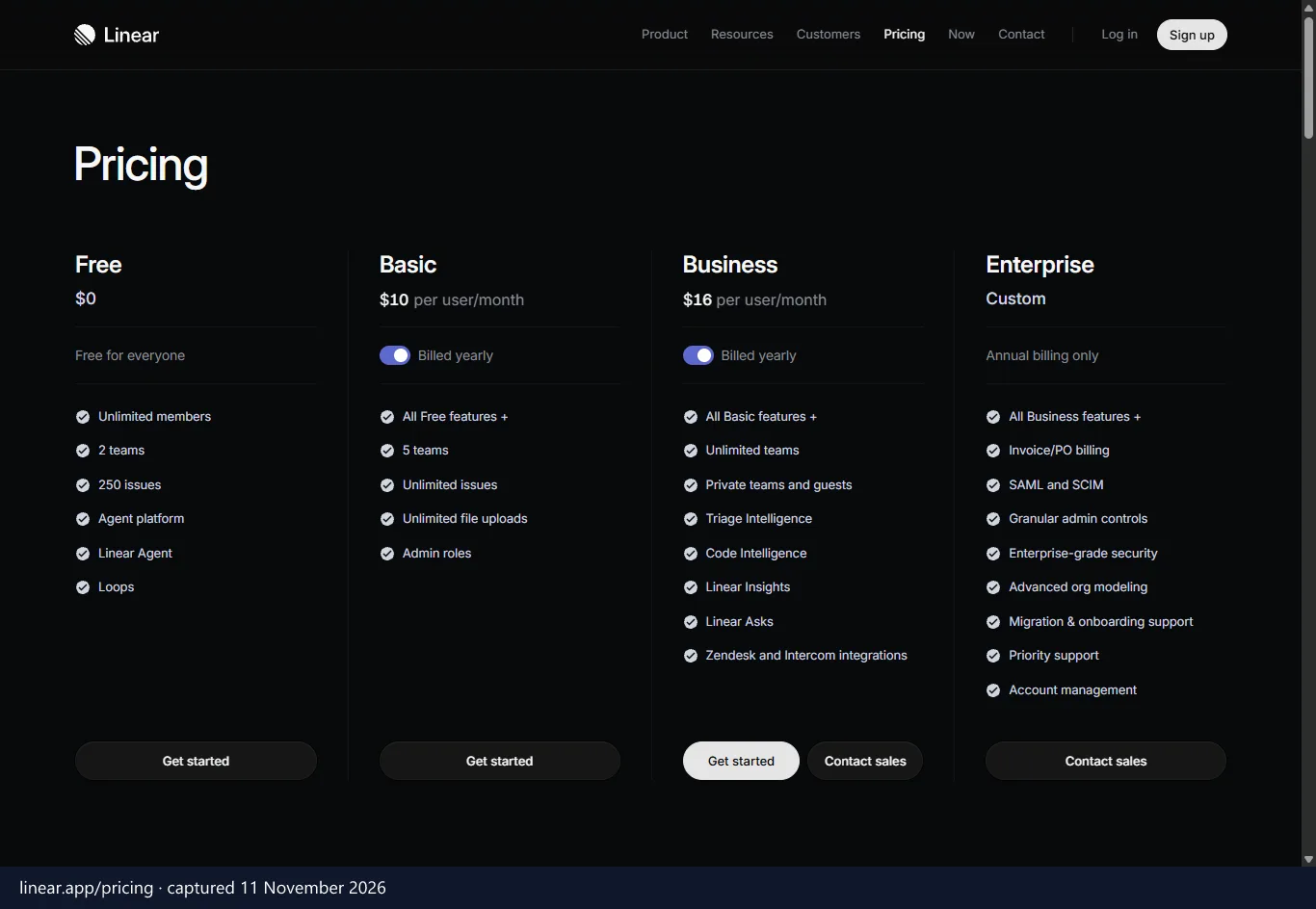
Linear key facts: A Free plan supports unlimited members with up to 250 active issues. The Standard plan costs US$8 per member per month when billed yearly, offering unlimited active issues and file uploads. For more advanced features like roadmaps and SLA tracking, the Plus plan is US$14 per member per month yearly. Source: linear.app/pricing, checked October 2026.
Linear downsides: Custom EU data residency is restricted to the Enterprise tier. It lacks native client billing or heavy Gantt charting, making it less suitable for agencies or complex project management outside of core development.
Compared to Jira, Linear provides a much quicker, less cluttered experience for day-to-day issue tracking. Jira's backlog management can feel heavy with its extensive configuration options. Linear's focus on speed and a clean UI means less overhead for sprint planning and backlog grooming, which can be a significant advantage for agile teams. While Jira offers deep integration with the broader Atlassian ecosystem, Linear's integrations with tools like GitHub and Slack are streamlined for developer needs. If you are looking to accelerate your development cycles and reduce administrative friction, Linear is a strong contender. You can find more details at Linear pricing in Europe (October 2026): plans, free plan & deals.
Plane verdict: Top open-source software development tracker matching Jira's sprint cycles and backlog structure
Plane is a comprehensive work infrastructure platform that combines projects, a wiki, service requests, and AI into one system. It is an excellent open-source alternative for software development, providing familiar sprint cycles (called Cycles) and a flexible backlog structure that aligns well with Jira's approach.
Plane key facts: The Commercial Edition is free for up to 12 users. The Pro plan costs US$6 per seat per month when billed yearly and includes features like cycles, epics, and a wiki. For advanced intake features, the Business tier is available.
Plane downsides: Advanced intake features, such as custom forms and intake email addresses, require the Business tier. Air-gapped deployment, essential for highly secure or offline networks, is part of the Enterprise Grid plan. The Time tracking and Jira importers are features of the Commercial or Pro tiers, not the free Community Edition.
Plane positions itself as a comprehensive replacement for Jira, particularly for teams seeking self-hosted options and greater control over their data. Its Cycles offer time-boxed sprints with burndown charts, and it supports modules, epics, initiatives, and milestones for planning above the sprint level. This mirrors Jira's capabilities for managing complex projects and releases. Plane also includes a collaborative wiki, which can replace a separate tool like Confluence, keeping documentation alongside your work items. For teams moving from Jira, Plane offers importers from Jira Cloud, Server, and Data Center, easing the migration process. This makes Plane a compelling choice if you need a powerful, open-source platform with a similar structure to Jira but with the flexibility of self-hosting.
Jira Alternatives for agencies and cross-functional teams
Agencies and cross-functional teams often need more than just issue tracking. They require tools that can handle client projects, track time, manage budgets, and offer flexible views for diverse departmental needs. These alternatives provide a broader scope of project and work management.
ClickUp verdict: Best value for all-in-one operations needing time tracking and whiteboards alongside tasks
ClickUp is an all-in-one productivity platform designed to manage projects, tasks, and workflows across various departments. Its strength lies in its versatility, offering a wide range of features from task management to time tracking and whiteboards, making it suitable for diverse operational needs.
ClickUp key facts: A Free Forever plan includes unlimited tasks and members, with 100MB of storage. The Unlimited tier costs US$7 per user per month when billed yearly, offering unlimited storage, integrations, Gantt charts, and native time tracking. The Business tier, at US$12 per user per month yearly, adds advanced automations and workload management.
ClickUp downsides: EU data residency is restricted to the Enterprise tier. While feature-rich, its density can sometimes feel cluttered for teams seeking a simpler, more focused development workflow.
ClickUp stands out for its comprehensive feature set, often replacing multiple tools. For an agency, its native time tracking and resource management capabilities, available from the Unlimited tier, are significant. Unlike Jira, which often requires marketplace add-ons for such functions, ClickUp integrates them directly. This makes it easier to track billable hours and manage team capacity. Its customizable views and collaborative docs also help cross-functional teams align on projects, from marketing campaigns to product launches. However, teams accustomed to Jira's developer-centric interface might find ClickUp's broader approach less specialized for deep engineering tasks. You can learn more about ClickUp's offerings at ClickUp pricing in Europe (October 2026): plans, free plan & deals.
monday.com verdict: Best visual workflow builder for non-technical departments and marketing projects
monday.com is a work operating system known for its highly visual and adaptable board-based structure. It allows teams to build custom workflows for almost any process, making it ideal for non-technical departments like marketing, sales, and HR, as well as for managing client projects.
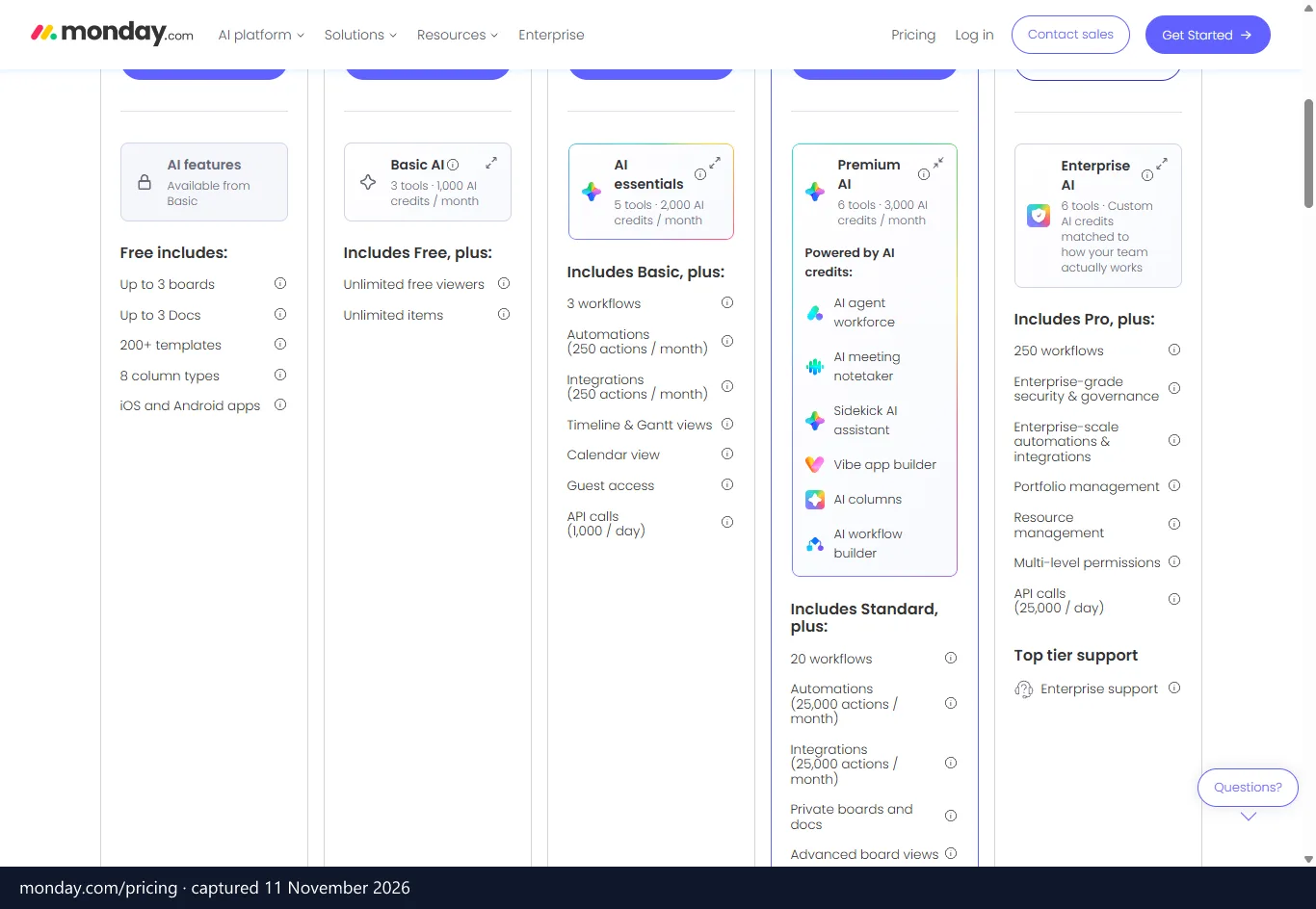
monday.com key facts: A Free tier supports up to 2 seats with 3 boards. The Basic plan costs €9 per user per month when billed yearly and includes unlimited free viewers and 5 GB storage. At €12 per user per month yearly, the Standard plan adds Timeline & Gantt views and calendar views. The Pro plan, at €19 per user per month yearly, offers private boards, chart views, and time tracking.
monday.com downsides: Minimum seat thresholds may apply for certain plans. EU data residency (AWS Frankfurt storage) is locked behind the Enterprise tier.
monday.com's strength is its flexibility and visual appeal. For agencies managing diverse client projects, its customizable boards can be tailored to track everything from content creation to campaign launches. Unlike Jira, which is often perceived as rigid outside of software development, monday.com's drag-and-drop interface and extensive template library make it easy for non-technical users to set up and manage projects. The time tracking column in the Pro plan is a valuable feature for agencies needing to monitor billable hours. Its multi-board dashboards also provide a high-level overview of project health, a feature crucial for client reporting. While it can handle development tasks, its primary appeal is for broader project management and workflow automation. Discover more about monday.com at Monday.com pricing in Europe (October 2026): plans, free plan & deals.
Teamwork.com verdict: Purpose-built for agency client retainers, billable hours, and project margin tracking
Teamwork.com is an AI-powered project and resource management platform specifically designed for client work. It integrates projects, time tracking, resource scheduling, budgets, and profitability reporting, making it a powerful tool for agencies, IT services firms, and consulting teams.
Teamwork.com key facts: A Free tier is available for up to 5 users. The Basics plan costs US$9.99 per user per month when billed annually. The Accelerate plan is US$24.99 per user per month when billed annually.
Teamwork.com downsides: It is less suited for pure software development sprint workflows, as its focus is on client project delivery. Teams that do not track time or budgets may find some of its specialized features unnecessary.
Teamwork.com fills a critical gap that Jira was never built to address: the complexities of client work. Its built-in time tracking and budgeting allow teams to log billable and non-billable hours directly on tasks, providing real-time budget burn-down per project. Resource scheduling helps manage team capacity, and profitability reporting tracks margins at the project, client, and portfolio level. These features are often missing or require extensive add-ons in Jira. For agencies where success is measured by billable utilization and project profitability, Teamwork.com offers a highly integrated solution.
Asana verdict: Strong cross-departmental coordination tool for department goals and workflow automation
Asana is a work management platform that helps teams coordinate projects, tasks, and goals across different departments. It is widely used by marketing, operations, and product teams for its clean interface and extensive features for aligning work with company objectives.
Asana key facts: A Personal tier is free for up to 10 users. The Starter plan costs US$10.99 per user per month when billed annually. The Advanced plan is US$24.99 per user per month when billed annually.
Asana downsides: It lacks built-in time tracking or budget management, which are crucial for agencies managing billable client work. Client-facing features often require workarounds, and advanced reporting is limited without higher-tier plans.
Asana excels at providing visibility into who is doing what and when, making it strong for internal project coordination. Its multiple project views (list, board, timeline, calendar) cater to different work styles, and its workflow builder helps automate routine tasks. For cross-departmental alignment, Asana's ability to connect daily tasks to company-level objectives is a significant advantage over Jira, which is more focused on development sprints. However, for agencies that need to track client profitability or manage billable hours, Asana would require integrating separate tools, adding to complexity and cost.
Self-hosted open source Jira Alternatives
For teams prioritizing data ownership, compliance, or air-gapped deployments, self-hosted open-source solutions are essential. These alternatives offer control over your infrastructure, moving beyond Jira's cloud or Data Center options.
Plane Community Edition verdict: Uncapped open-source AGPL-3.0 replacement for self-managed cloud or Docker installs
The Plane Community Edition is a powerful open-source project management platform licensed under AGPL-3.0. It provides a free, user-unlimited solution for teams needing to self-host their work infrastructure, including projects, wikis, and service requests. It is deployable via Docker Compose, Kubernetes, Docker Swarm, or Podman.
Plane Community key facts: US$0 license cost, unlimited users, and full core project management layouts (List, Board, Calendar, Gantt, Spreadsheet). It includes essential features like cycles (sprints), work item relations, custom types, and custom properties.
Plane Community downsides: Time tracking and Jira importers are features of the Commercial or Pro tiers, not the free Community Edition. This means for advanced functionality or migration from Jira, you would need to consider the paid editions.
The Plane Community Edition is an excellent choice for teams looking for a reliable, free, and self-hostable alternative to Jira. It provides the core project management features necessary for software development, including sprint-like cycles and various views to manage work items. For teams migrating from Jira, the ability to deploy Plane on their own infrastructure means retaining full data control, a significant advantage over cloud-only solutions. Its open-source nature also offers transparency and flexibility for customization, which is appealing to technical teams.
OpenProject verdict: Premier GPL-3.0 open-source alternative for Gantt baselines, cost planning, and heavy scheduling
OpenProject is a leading open-source project management software licensed under GPL-3.0, specifically strong for teams focused on detailed scheduling, cost planning, and Gantt charts. It is a comprehensive solution for managing complex projects, including those in construction or engineering, that require advanced planning capabilities.
OpenProject key facts: A Free Community Edition offers unlimited users. The paid Enterprise self-hosted version starts from US$7.25 per user per month, with a 25-user minimum. It includes features like sprints, Gantt charts, and time tracking.
OpenProject downsides: The paid self-hosted tier has a higher seat minimum of 25 users, which might be a barrier for smaller teams. Its user interface (UI) can feel more traditional compared to modern web applications like Linear or monday.com, which might require a slight adjustment for teams used to sleeker designs.
OpenProject is a powerful contender for teams that rely heavily on traditional project management methodologies, especially those involving detailed scheduling and budget tracking. Its strength in Gantt baselines and cost planning goes deeper than many other alternatives, making it suitable for projects where these elements are critical. While Plane also offers Gantt layouts and time tracking, OpenProject's focus on heavy scheduling and its open-source nature make it a strong alternative for specific use cases. For organizations that need a self-hosted solution with advanced scheduling and budget features, OpenProject provides enterprise-grade capabilities with the flexibility of open source.
Self-hosted cost analysis comparing zero-cost open-source code against mandatory maintenance overhead
While open-source solutions like Plane Community Edition and OpenProject Community Edition offer a US$0 license cost, it is essential to consider the total cost of ownership (TCO) for self-hosting. The "free" aspect typically refers to the software license, not the operational overhead.
You will need to account for infrastructure costs, including servers (physical or virtual), storage, and networking. This also involves the time and expertise of your IT team for installation, configuration, maintenance, security updates, and backups. For a small team, this can be a significant hidden cost. For example, Plane recommends 2 CPU cores and 4 GB of RAM as a minimum, with 8 GB for production, which translates to ongoing server expenses.
In contrast, a managed cloud service, even with a per-user fee, offloads all these infrastructure and maintenance responsibilities to the vendor. While the per-user price might seem higher, it often eliminates the need for dedicated IT staff time and hardware investments for the project management tool itself. For European businesses, self-hosting also means you are directly responsible for ensuring GDPR compliance within your own infrastructure, which can be complex. The choice between zero-cost open-source code and paid cloud services comes down to your team's technical capabilities, budget for infrastructure, and appetite for operational responsibility.
EU data residency and GDPR compliance mapping
For European businesses, data residency and GDPR compliance are not optional; they are mandatory. Evaluating these aspects is crucial when choosing a Jira alternative. This section maps how different vendors address data hosting, legal terms, and tax compliance.
Mandatory evaluation: Mapping vendor data hosting locations across standard versus Enterprise pricing tiers
The location where your data is stored is a primary concern for GDPR compliance. Many SaaS providers operate globally, but for European businesses, having data hosted within the EU can simplify compliance and address data sovereignty requirements.
Jira Cloud provides native EU data residency, with servers located in Frankfurt, Germany, and Dublin, Ireland, across its standard cloud tiers. This is a significant advantage for European companies, as it ensures data stays within the EU without requiring an Enterprise-level plan.
In contrast, several prominent Jira Alternatives gate European server locations behind their higher-tier Enterprise plans. Linear, for example, offers custom EU data residency only on its Enterprise tier. Similarly, ClickUp provides EU data residency via AWS Ireland and Frankfurt, but this option is available on Enterprise plans. monday.com also restricts AWS Frankfurt storage to its Enterprise tier. This means that for many European small and medium-sized businesses, accessing EU data residency on these platforms often comes with a much higher price tag, as they would need to subscribe to the most expensive plans. It is crucial to verify these details before committing to a platform.
GDPR Data Processing Addendum (DPA) terms, Standard Contractual Clauses (SCCs), and ISO 27001 certifications across US and EU vendors
A thorough Data Processing Addendum (DPA) is fundamental for GDPR compliance (Article 28). This legal document outlines how a service provider (processor) handles personal data on behalf of your business (controller). All vendors should offer a DPA that includes Standard Contractual Clauses (SCCs) to legitimize data transfers outside the EU, especially for US-based companies.
Jira, from Atlassian (based in Australia/Netherlands), provides a GDPR DPA with Binding Corporate Rules (BCR) and SCCs. It is also ISO 27001 and SOC 2 certified.
US-based vendors like Linear, ClickUp, and Asana also provide GDPR-compliant DPAs with SCCs. ClickUp is additionally EU-US Data Privacy Framework certified, SOC 2 Type II, and ISO 27001 compliant. Linear is SOC 2 Type II certified. monday.com, based in Israel (which has an adequacy decision from the European Commission), offers a GDPR DPA with SCCs and is ISO 27001 and SOC 2 Type II certified.
For self-hosted solutions like Plane, the responsibility for GDPR compliance largely falls on your organization, as you control the infrastructure. However, Plane lists SOC 2, ISO 27001, GDPR, and CCPA on its security page for its cloud offering. Always review the specific DPA terms to ensure they meet your organization's compliance requirements, especially regarding sub-processors and breach notification procedures.
Tax compliance for UK and EU business software purchases: UK reverse charge under HMRC VAT Notice 741A versus EU B2B VAT reverse charge mechanism
When purchasing SaaS subscriptions from vendors in different countries, understanding VAT and tax compliance is essential for European businesses.
For UK VAT-registered buyers, the UK reverse charge mechanism applies to most digital services purchased from outside the UK. Under HMRC VAT Notice 741A, you do not pay VAT to the supplier. Instead, you account for both the output VAT and input VAT on your VAT return, effectively 'reversing' the charge. This means the net effect on your cash flow is often zero, but you still need to declare it correctly.
For VAT-registered businesses in the EU, the B2B VAT reverse charge mechanism generally applies when buying digital services from a supplier in another EU member state or from outside the EU. You provide your VAT number to the supplier, who then issues an invoice without VAT. You, as the recipient, are responsible for accounting for the VAT in your own country. This mechanism avoids the need for the foreign supplier to register for VAT in your country. Always ensure your VAT number is correctly provided to the vendor to benefit from these reverse charge rules.
Jira Server EOL and Data Center pricing
Atlassian's strategic shift away from self-hosted Server products has significantly impacted many organizations, forcing them to re-evaluate their project management tools. Understanding the timeline and implications is crucial for those still on legacy systems or considering Data Center.
Atlassian ended support for Jira Server on February 15, 2024. This move effectively forced all self-hosted users to migrate to either Jira Cloud or Jira Data Center. For many smaller teams, this meant a forced migration that came with higher costs and a steeper learning curve, prompting many to look for alternatives.
Jira Data Center, while still supported for now, also has an end-of-life date. It reaches end of life on March 28, 2029. New license sales for Data Center stopped on March 30, 2026, and existing customers can only buy or expand licenses until March 30, 2028. This clear roadmap indicates Atlassian's long-term focus on cloud offerings, making Data Center a temporary solution for many.
Analysis of total cost of ownership when combining Jira Standard (US$7.75/user/mo) with Confluence and Marketplace apps
While Jira Standard's per-user pricing of US$7.75 per user per month (billed yearly) might seem competitive, the total cost of ownership (TCO) often climbs quickly. Many teams need more than just Jira's core issue tracking. For documentation, Confluence is often added. For features like time tracking, advanced reporting, or specific integrations, teams frequently rely on the Atlassian Marketplace, which means additional per-user or per-app costs.
Adding Confluence, which has its own pricing tiers, and a few essential marketplace apps can easily double or triple this cost. This "add-on" model means many teams outside of pure software development end up paying for features they never use in Jira while still incurring extra costs for the functionalities they genuinely need. This complexity and escalating cost structure is a primary reason teams seek all-in-one alternatives like ClickUp or purpose-built solutions like Teamwork.com.
Migration complexity: Assessing built-in Jira import tools in Plane and Linear versus manual data exports
Migrating from Jira, especially from Server or Data Center, can be a complex undertaking. The ease of migration is a critical factor when choosing an alternative. Some alternatives offer built-in tools designed to simplify this process.
Plane, for example, provides importers for Jira Cloud, Jira Server, and Jira Data Center. This helps transfer existing projects, issues, and associated data, reducing the manual effort involved. Linear also supports issue imports and exports, which can facilitate moving data out of Jira.
However, not all alternatives offer such comprehensive migration tools. In many cases, you might need to rely on manual data exports from Jira (e.g., CSV, XML) and then manually import them into the new platform or use generic API integrations. This can be time-consuming and prone to errors, especially for large, complex Jira instances with extensive custom fields and workflows. When evaluating an alternative, inquire about their specific migration path and tools, as this can significantly impact the effort and cost of switching. For more information on Jira, visit Jira pricing in Europe (October 2026): plans, free plan & deals.
How Jira alternative pricing stacks up
Understanding the real costs of project management tools is vital. This section provides a unified comparison of baseline pricing for Jira and its key alternatives, focusing on entry-level paid tiers and free plan limits. All prices are before VAT and reflect the vendor's native currency.
| Tool | Free Tier Limits | Entry Paid Tier (per user/month, yearly bill) | Native Currency | Source (checked October 2026) |
|:-------------- |:----------------------------------------------- |:-------------------------------------------- |:-------------- |:---------------------------------------- |
| Jira Standard | Up to 10 users, 2GB storage | US$7.75 | US$ | atlassian.com/software/jira/pricing |
| Linear Standard | Unlimited members, up to 250 active issues | US$8 | US$ | linear.app/pricing |
| ClickUp Unlimited | Unlimited tasks, unlimited members, 100MB storage | US$7 | US$ | clickup.com/pricing |
| monday.com Basic | Up to 2 seats, 3 boards | €9 | € | monday.com/pricing/ |
| Plane Pro | Free up to 12 users | US$6 | US$ | plane.so/blog |
| Teamwork.com Basics | Up to 5 users | US$9.99 | US$ | teamwork.com/blog (checked June 2026) |
| OpenProject Enterprise | Free Community Edition (unlimited users) | US$7.25 (25-user minimum) | US$ | openproject.org & plane.so/blog |
| Asana Starter | Free for up to 10 users | US$10.99 | US$ | teamwork.com/blog (checked June 2026) |
(Note: Teamwork.com and Asana pricing was sourced from teamwork.com/blog, which was checked June 2026).
Free tier limits breakdown: member caps versus feature or issue limits
When evaluating free plans, pay close attention to their limitations. Some vendors cap the number of users, while others restrict features or the volume of work items.
Jira's Free plan is generous with a 10-user limit, but it includes only 2GB of cloud storage and basic reporting. Linear's Free plan allows unlimited members but caps active issues at 250, making it suitable for smaller projects or trial runs. ClickUp's Free Forever plan offers unlimited tasks and members but limits storage to 100MB. monday.com's Free tier is more restrictive, allowing only up to 2 seats and 3 boards. Plane Community Edition is truly unlimited for users at US$0 license cost, but advanced features are in paid tiers. OpenProject's Community Edition also has unlimited users for free. Asana's Personal tier is free for up to 10 users, focusing on individual or small team task management.
Entry paid tier cost comparison for a standard 10-person software team
For a standard 10-person software team, the entry-level paid plans show clear differences:
Clear financial verdict based on team size and hosting model
For a small to medium-sized software development team (e.g., 10-20 people) prioritizing cost-efficiency in a cloud environment, ClickUp offers the best value with its Unlimited tier, closely followed by Linear. If self-hosting is a priority and you have the technical resources, Plane Pro offers a highly competitive price at US$6 per seat per month, making it a strong financial choice for data control.
For agencies requiring solid client management and profitability tracking, Teamwork.com provides purpose-built features, though at a slightly higher per-user cost. For cross-functional teams needing visual flexibility, monday.com offers a good balance, but its EU data residency often requires the more expensive Enterprise plan. OpenProject is financially viable for larger self-hosted teams (25+ users) needing advanced scheduling. If you are a small team that needs basic task management, Asana's free tier is a good starting point.
Frequently asked questions about Jira Alternatives
Is there a completely free open source Jira alternative?
Yes, there are completely free open-source Jira Alternatives. Plane Community Edition, licensed under AGPL-3.0, offers a full core project management system with unlimited users at US$0 license cost. OpenProject also provides a free Community Edition under GPL-3.0, with unlimited users and strong project scheduling features. Both allow you to self-host without license fees.
Which Jira alternative is fastest for developer workflows?
Linear is widely regarded as the fastest Jira alternative for developer workflows. Its keyboard-first user interface and minimalist design minimize clicks and context switching, allowing developers to navigate issues, create tasks, and update statuses with exceptional speed. This focus on efficiency makes it ideal for high-velocity development teams.
Can I host a Jira alternative on my own infrastructure?
Absolutely. Plane and OpenProject are two leading Jira Alternatives that offer flexible self-hosting options. Plane can be installed with Docker Compose or Kubernetes, supporting air-gapped deployments for maximum data control. OpenProject also provides options for on-premises installation, giving you full ownership of your data and infrastructure.
How do EU teams handle VAT when buying US-based software subscriptions?
EU teams registered for VAT typically use the B2B VAT reverse charge mechanism. When purchasing software subscriptions from a US-based vendor, you should provide your VAT registration number. The vendor will then issue an invoice without charging US sales tax or EU VAT. You, as the recipient, are responsible for accounting for the VAT in your own country's VAT return. For UK VAT-registered buyers, this is specifically covered by the UK reverse charge under HMRC VAT Notice 741A.
Sources and how this was compiled
Compiled by the SaaSEuro team from the vendors' official documentation; we have not hands-on tested these products. Facts last checked in October 2026.
Source: official vendor pages, checked October 2026.
- Linear pricing page
- Linear data location and security
- Linear data processing agreement (DPA)
- Jira pricing page
- Jira data location and security
- Jira data processing agreement (DPA)
- Monday.com pricing page
- Monday.com data location and security
- Monday.com data processing agreement (DPA)
- ClickUp pricing page
- ClickUp data location and security
- ClickUp data processing agreement (DPA)
Which Jira alternative should you pick
Choosing the right Jira alternative depends entirely on your team's specific needs and priorities. For fast-paced engineering teams seeking streamlined issue tracking and minimal administrative setup, Linear is the clear choice. Its keyboard-first UI and focus on core development workflows mean less friction and more productivity.
If your team is cross-departmental, requiring flexible views and powerful automations for diverse projects, ClickUp or monday.com offer adaptable solutions. ClickUp provides an all-in-one workspace with integrated time tracking, while monday.com excels with its visual, customizable boards for non-technical users.
For European teams prioritizing self-hosted data control and open-source transparency, Plane or OpenProject are excellent options. Plane serves as a comprehensive work infrastructure, while OpenProject is ideal for projects with heavy scheduling and budget requirements.
Your concrete next step should be to test one real project sprint on the free tier of your top choice. Testing the tool directly helps you evaluate its fit before committing to a full workspace migration.