











n8n vs Make for European teams: see how credits and executions change your bill, and where each tool hosts your data, from Frankfurt to self-hosted.
The n8n vs Make choice comes down to who builds your workflows. Pick Make if business teams will build on a managed cloud without writing code. Pick n8n if engineers need self-hosting, custom code or LangChain agents, or if per-step billing gets expensive at your volumes. Below, you will find costs, AI agents, connectors and EU hosting compared, using figures from both vendors' own pages.
n8n vs Make: TL;DR and quick verdict
Make suits non-technical teams on a managed cloud. n8n suits technical teams that want control over code, hosting and cost.
Make suits marketing, sales and operations teams that want a managed cloud platform with 3,500+ pre-built connectors. Nobody runs a server or writes code. It does not suit you if you must host on your own infrastructure, because Make is cloud-only on every plan.
n8n suits technical teams that need self-hosting, JavaScript or Python inside workflows, or LangChain AI agents. It also suits high-volume runs, where one price per execution keeps costs flat. It does not suit a team with nobody who can maintain a server or read raw JSON, since n8n assumes that skill from day one.
Our editorial picks rest on five criteria: price and plan limits, EU data control, DPA terms, integrations, and who has to run the platform. On those, Make is the best pick for non-technical teams. n8n is the best pick for EU data control and for long, multi-step workflows.
| Factor | Make | n8n |
|---|---|---|
| Deployment | Managed cloud only, on every plan | Self-hosted Community Edition, or n8n Cloud |
| Billing metric | Credits, charged per step (most steps cost one) | Executions, charged per full workflow run |
| Plan limit to watch | Monthly credits, which every step uses | Monthly executions and concurrent executions |
| Price list currency | US$ | £ |
| Free route | Permanent Free plan | Free self-hosted Community Edition; 14-day Cloud trial |
| Pre-built apps | 3,500+ | 1,000+ to 2,100+, depending on who counts |
| Custom code | JavaScript custom function, Enterprise only | JavaScript and Python Code node |
| European roots | Czech origin; privacy notice issued by Celonis | n8n GmbH, Berlin, Germany |
Source: the two vendors' pricing and comparison pages, checked October 2026.
The free options are not equal
Make gives you a Free plan that never expires. It is enough to build and keep running one or two simple automations, and its limits appear in the pricing table below.
n8n has no free cloud plan. n8n Cloud comes with a 14-day trial, no credit card required. The free route is the Community Edition on GitHub, which you install, secure and update yourself.
Workflow builders and visual interfaces compared
Make is easier to start with, and n8n is easier to push far. The difference shows the moment you open each canvas.
Make calls automations Scenarios, and each step is a circular module joined by lines. Logic lives in visual constructs: routers for conditional branching, iterators for looping through arrays, and aggregators that merge many items into one. Error handlers attach to individual modules, so you set retries, fallback paths or notifications right on the canvas.
n8n uses a node-based flowchart. It supports linear and non-linear paths, loops, branching, merging and parallel execution, and one workflow can hold several triggers. The editor shows the exact JSON going into and out of every node. That helps when an LLM returns something odd and you need to see what it actually received.
Scale changes the picture. Make offers Grid, a live map of workflows and AI agents with dependencies and error notices. Make's comparison page says n8n has no comparable view, so reusing a tool across workflows means copying it between canvases. On the other hand, n8n's flowchart copes well with heavily branched logic inside a single workflow.
Make's canvas looks busy, with colourful icons and branching lines. Still, a marketing or support person can learn it, helped by structured learning material and the prompt-based Maia builder. n8n's interface looks cleaner, but it pushes you into variables and expressions early.
If you are an engineer, that feels fast. If you just want to hand a new lead to a salesperson, it feels like homework. Picture a marketing ops lead who needs a form-to-CRM flow by Friday: Make gets it done, while n8n probably needs a developer's afternoon.
Code and data mapping
n8n lets you drop a Code node anywhere and run JavaScript or Python. You can use JavaScript inside expressions too. Data is JSON, so you reshape it with code.
Make treats code as a special case. A custom function that runs Node.js snippets exists on the Enterprise plan only. Everyone else uses the HTTP module, or builds a Custom App with the developer SDK. Mapping data is a drag-and-drop job with spreadsheet-style pills and Excel-like formulas, which suits people who live in Sheets.
n8n executions vs Make credits pricing explained
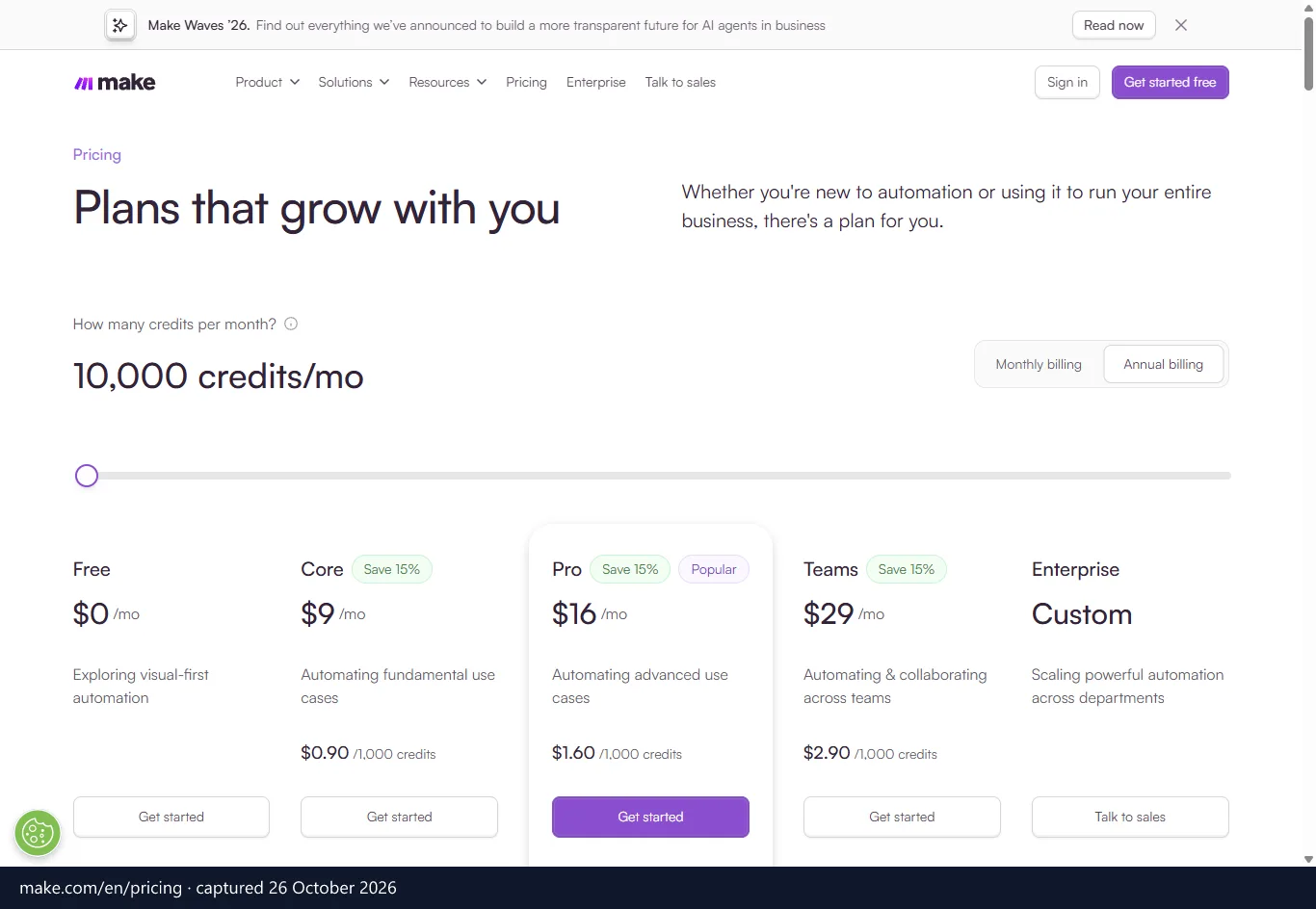
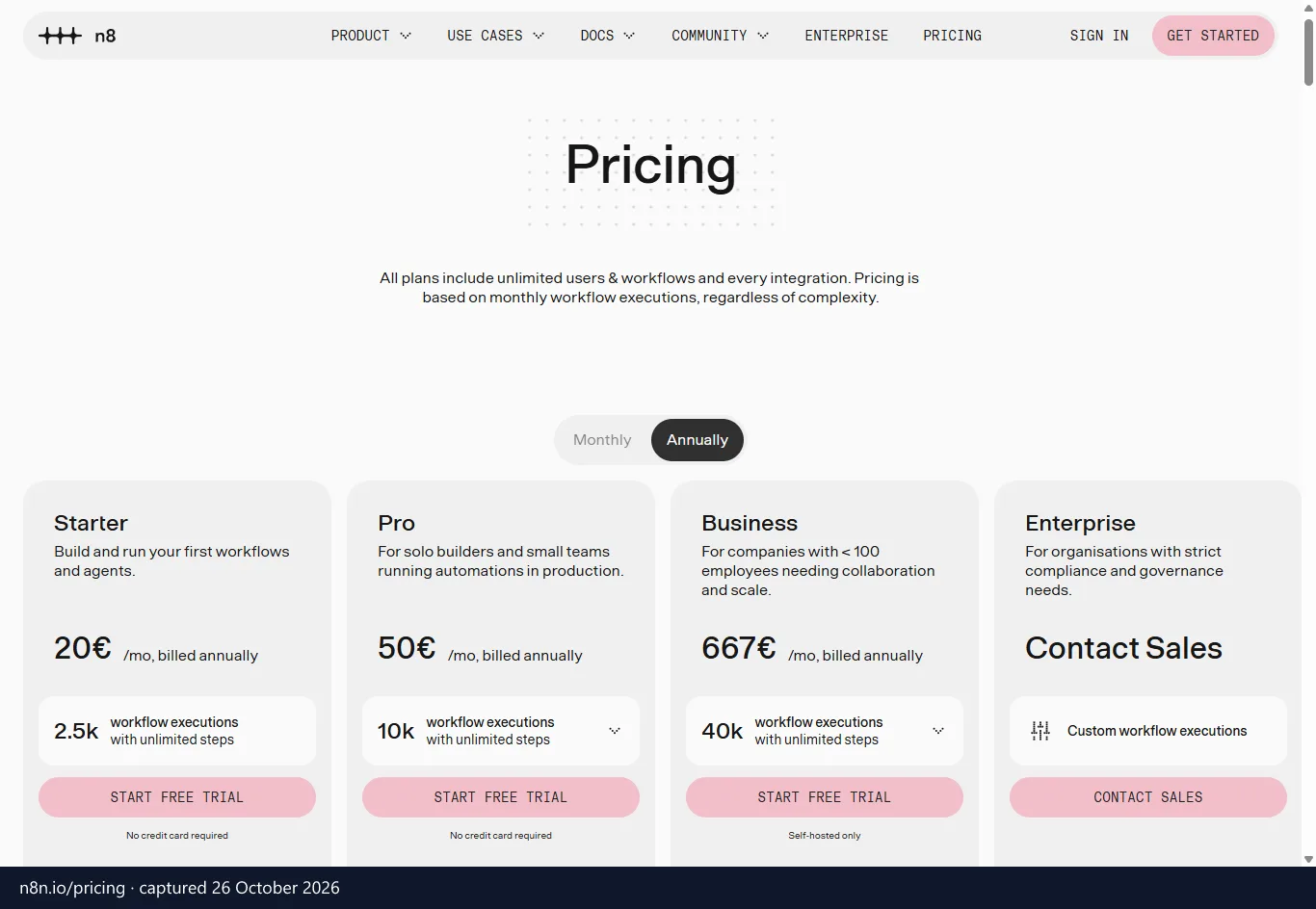
n8n charges per workflow run and Make charges per step. That one difference decides which costs less as your automations grow.
Make moved its billing unit from operations to credits on 27 August 2025. Most standard actions convert one-to-one, so one step usually costs one credit. AI modules work differently: they can consume a variable number of credits depending on token use, file size or processing time.
| Make plan | Yearly billing, per month | Monthly billing | Credits / month | Extras |
|---|---|---|---|---|
| Free | US$0 | US$0 | 1,000 | 2 active scenarios |
| Core | US$9 | US$10.59 | From 10,000 | Unlimited scenarios, 1-minute interval, Make API |
| Pro | US$16 | US$18.82 | From 10,000 | Priority execution, custom variables, log search |
| Teams | US$29 | US$34.12 | From 10,000 | Team roles and permissions, shared templates |
| Enterprise | Custom | Custom volume | SSO, dedicated support, enterprise SLA | |
Prices are in US$, before VAT.
How n8n executions work
An n8n execution is one full workflow run, however many nodes it contains. A two-step flow and a 200-step AI agent each count once. Every plan includes unlimited users and workflows.
| n8n plan | Yearly billing, per month | Monthly billing | Executions / month | Hosting and extras |
|---|---|---|---|---|
| Community Edition | Free | Free | Not metered | Self-hosted, from GitHub |
| Starter | £20 | £24 | 2,500 | Hosted by n8n, 5 concurrent executions |
| Pro | £50 | £60 | 10,000 | Hosted by n8n, up to 50 concurrent executions, admin roles |
| Business | £569 | £682 | 40,000 | Self-hosted only, SSO and LDAP, multiple environments, Git version control |
| Enterprise | Custom | Custom | Hosted or self-hosted, log streaming | |
Prices are in £, before VAT. The same n8n page shows euro prices to some visitors (see the n8n screenshot above, captured 26 October 2026): €20, €50 and €667 a month billed annually for Starter, Pro and Business. One catch: the 40,000-execution Business plan is self-hosted only, so on n8n's own cloud the tiers stop at Pro until you move to Enterprise.
A 10-step example
Say a 10-step automation runs 1,000 times a month. On Make, at one credit per step, that is about 10,000 credits, a full entry-level allowance. On n8n, it is 1,000 executions, and fewer if you batch records into each run.
The gap flips for short flows. A three-step automation that fires a few hundred times a month fits comfortably inside Make's allowance. Make argues that moderate-volume, few-step workflows are where its model wins. For a flow that loops through hundreds of records, however, n8n's per-run billing is the safer bet.
Compare the billing unit, not the sticker price, because the two vendors list in different currencies. You can see Make and n8n prices side by side with plan limits and GDPR terms in one view.
Some limits sit outside the bill. n8n's comparison page says Make ties data transfer to your plan (for example 5GB per 10,000 operations) and Data Store space to 1MB per 1,000 operations. It adds that Make's API is rate-limited from 60 calls a minute on Core, while each n8n Cloud instance gets up to 100GB of data storage.
The real cost of the free edition
Community Edition costs nothing in licence fees. You still pay for a VPS or server, monitoring, backups, security patches and updates. n8n recommends self-hosting for expert users only, and it sells a self-hosted Business plan when you need SSO, environments and Git.
If your team already runs servers, the extra work is small. If not, the engineering time can outweigh the saving. Our breakdown of n8n cloud versus self-hosted costs goes deeper on that trade-off.
AI agent capabilities and LangChain orchestration
n8n gives you deeper control over AI agents, while Make gets a goal-driven agent running faster. The right one depends on whether you want to engineer agents or simply configure them.
Make's agents are in open beta. You describe the agent's goal in a system prompt, and it decides which tools to use. Those tools are existing scenarios or single modules, so an agent can reach across the 3,500+ apps without custom development. Every decision is logged on the canvas.
Retrieval is built in. You upload PDF, CSV or DOCX context files up to 20MB, and Make embeds and stores them in its own retrieval infrastructure. No external database is needed. Make also lists pre-configured MCP server integrations, and its comparison page says matching this on n8n means setting up a RAG database and wiring the orchestration yourself.
The limits are clear, though. Models are managed ones plus optional connections to OpenAI, Claude and Gemini, with no support for local, self-hosted models. Because the feature is still in beta, treat it as managed goal automation rather than serious agent engineering.
How n8n builds agents on LangChain
The n8n AI Agent node is built on LangChain's JavaScript primitives. A Tools Agent lets the model reason about which tool to call. With the Call n8n Workflow tool, an agent can invoke a whole workflow as a tool, so one agent can delegate to another in a hierarchy.
Model choice is wide: OpenAI, Claude, Google Gemini, Azure OpenAI and other providers through OpenAI-compatible APIs. For retrieval, supported vector stores include Pinecone, Qdrant, Weaviate and PGVector. The price of that flexibility is learning. You need some feel for LangChain concepts and prompt design, which is why n8n is low-code rather than no-code for advanced agents.
Keeping AI data in-house
This is where n8n pulls clearly ahead for European teams. It supports local models through Ollama, and the Self-hosted AI Starter Kit installs a local model, a vector store and PostgreSQL alongside n8n. Run that on your own network, and prompts and documents never have to leave it.
Imagine a clinic group that wants an assistant to summarise internal case notes. With n8n, the model, the vectors and the workflow can all sit behind its firewall. With Make, the data goes through managed models or a third-party API. You still own the security work on a self-hosted setup, but the choice is yours.
App integrations and custom connector flexibility
Make has the bigger ready-made catalogue, while n8n makes it easier to build whatever is missing. Count the apps you use today and you will usually know which way to lean.
Make offers 3,500+ company-maintained integrations, covering mainstream tools and the obscure ones only your finance team uses. Its own pages quote 3,000+ in places, so treat 3,500+ as the headline figure.
n8n counts 1,000+ integrations, made up of pre-built app nodes, credential-only nodes and verified partner-built nodes. Other published counts vary a lot, from 1,300+ to about 1,500, and Make's comparison page claims 2,100+. Either way, n8n's library is smaller. If your stack leans on niche apps, expect to reach for the HTTP Request node.
Custom APIs and community nodes
Both tools can call any REST API. n8n adds GraphQL and webhook nodes, and lets you write JavaScript or Python inside a workflow when a connector does not exist. You can build your own node as well, which turns an internal tool into a reusable component.
Verified partner nodes include SerpApi, ElevenLabs, Brave Search, Qdrant and Bright Data. Approved community nodes are available even on cloud tiers. Make warns that community nodes on self-hosted instances are not secured and may carry security risks. That is a fair point, so review any community node before it touches production credentials.
Make handles gaps through its Developer Hub. The Apps Editor lets you build, test and deploy custom apps, either private for internal tools or shared publicly, while the HTTP module covers quick API calls. n8n's code is visible on GitHub under the sustainable use licence, so you can fork it. Make is closed-source.
Make was called Integromat until its rebrand, and it launched in 2012. n8n pitches itself at teams who outgrow it. Typical triggers are an endpoint no pre-built module covers, or deep webhook handling with custom payloads.
European data privacy hosting and VAT rules
Both vendors have European roots, but n8n gives you the most control over where data lives. Here is what each one publishes.
n8n GmbH is a German company based in Berlin. It states a data processing agreement, the contract GDPR Article 28 requires between a controller and a processor. It also offers Standard Contractual Clauses for transfers outside the EU and a sub-processor list. Its security programme is aligned to SOC 2, which is an alignment, not a certification.
Make is of Czech origin, and its privacy notice is issued by Celonis. Celonis Inc. and Celonis Labs LLC are certified under the EU-US Data Privacy Framework. Make lists SOC 2 Type II, SOC 3 and ISO 27001 certifications, plus GDPR compliance, SSO and encryption. On certifications alone, Make shows more.
Hosting locations and self-hosting
Make is a fully managed, cloud-only platform. Workflows, credentials and processed data live on Make's infrastructure, which n8n's comparison page says runs on AWS in either the United States (Virginia) or the European Union. Enterprise customers can install an on-prem agent for secure data access, but scenarios still execute in the cloud. The largest enterprise customers can get a private cloud environment.
n8n Cloud runs on Microsoft Azure, with hardware and stored data in the Germany West Central data centre in Frankfurt. The Community Edition and the Business plan are self-hosted, so the data stays on your server, in a location you choose. For a hospital, a bank or a public body that must show where data sits, that is the strongest option here.
The burden moves to you, though. Self-hosted deployments need in-house security, patching and backup controls. A small team without that capacity may be safer on a managed platform.
VAT reverse charge for B2B buyers
Prices on both vendors are quoted before VAT. If you are a VAT-registered business in the EU buying a cross-border B2B service, the reverse charge usually moves the VAT accounting to you. Whether it applies depends on where the vendor and you are established, so check the treatment with your accountant.
UK buyers are outside the EU mechanism. A UK VAT-registered business accounts for B2B services from abroad under the UK reverse charge described in HMRC VAT Notice 741A. Our guide on how the reverse charge works for EU and UK buyers walks through both cases.
Which automation platform should you choose?
Choose by team skills first, then by volume, then by data rules. Support quality settles the close calls.
Make gives every paid plan official, ticket-based support from its own staff. Enterprise adds 24/7 support with two-hour SLAs, a dedicated account manager and consulting with Make's value engineers. The Help Center, Academy and community fill the gaps. n8n's comparison page, however, says some users on lower Make plans report slow or inconsistent ticket responses.
On n8n, most paid users get help through the community forum, which has 40,000+ members and a dedicated n8n support presence. Direct email support is for Enterprise customers, with guaranteed response times. If a business-critical flow breaks at 2 a.m., that gap matters.
Edge cases that change the answer
- You like n8n's model but have nobody to run servers: use n8n Cloud, which n8n hosts, and skip the Community Edition.
- Your automations are short and low-volume: Make's per-step billing costs little, and its Free plan may be enough.
- You want agents in production today: Make's agents are still in beta, while n8n's LangChain nodes are further along.
- You must keep data off third-party clouds: only a self-hosted n8n setup meets that.
Your next step
If business users will own the workflows and a managed cloud is fine, pick Make. If engineers own them, or the data cannot leave your network, pick n8n. Undecided? Count first.
Rebuild your busiest workflow on Make's Free plan and see how many credits it burns. That number shows whether n8n's per-execution billing would help. Then check it against Make's current European plans and offers and n8n's cloud and self-hosted tiers, both kept up to date with any live deals.